Digital signage media players
Digital Signage Media Players
Android or PC-based media players that connect to a compatible display over HDMI, with Wi-Fi and mobile-data options. Software is scoped separately.
Components & accessories
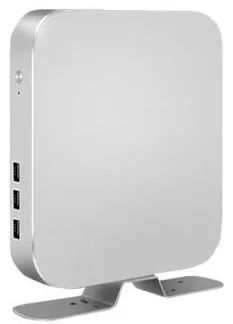
A media player is the small box behind the screen that stores and plays your content. If you already own good displays, or you are using screens that only have an HDMI input, a player is what turns them into digital signage.
Digital Signage Media Players (view the range) are listed in Android and PC-based versions, in a compact aluminium casing, connecting to the display over HDMI. Processing options are listed from quad-core and octa-core Android units up to a choice of PC processors, and Wi-Fi and mobile network connectivity are listed. The exact processor, memory and storage are confirmed for your configuration.
Choose the player by the software it has to run. Scheduled images and video make modest demands, and an Android player is the usual answer. A Windows application, a web dashboard or demanding video calls for a PC-based player. The player is hardware: digital signage content management is scoped and quoted separately, and many of our displays are listed with a built-in platform and need no player at all.
Catalogue
One product family in this category
Digital signage media players
Android or PC-based media players that connect to a compatible display over HDMI, with Wi-Fi and mobile-data options. Software is scoped separately.
Where they fit
Connect a player to a display you already own, over HDMI, and bring it into the same content schedule as your newer screens.
Drive stretched, double-sided or showcase displays that are listed with an HDMI input, using a player you choose.
Example application: a player behind each menu screen, so each section of the menu can be updated independently.
Provide the content source for an LCD video wall, feeding the wall's processor or controller over HDMI.
Use a PC-based player where the screen has to run a Windows application, a browser-based dashboard or software from another supplier.
Choosing
A display with a built-in Android or Windows configuration is tidier: one device, one power lead. A separate player is the better choice when the screens are already installed, when the display only offers an HDMI input, or when you want to replace or upgrade the player without taking the screen down.
Android players suit scheduled signage: images, video and simple layouts. PC-based players suit Windows software, web applications and heavier content. Quad-core and octa-core Android options and a range of PC processors are listed. The supported platform version is confirmed with your quotation.
The simplest arrangement is one player behind each screen, which is how the range is illustrated. Showing the same content on several screens from one source, or spreading one image across a video wall, needs additional distribution or processing equipment, which we assess with your project.
Wi-Fi and mobile network options are listed. A wired connection is usually the most dependable where a network point is available. The mobile option suitable for UK networks, and whether a wired port is fitted, are confirmed for the selected player. Mobile data contracts are arranged separately.
Beyond the hardware
Applications and management tools are designed and built per project, then quoted separately from the hardware.
Hardware, software and services combined around a job you need done.
Questions
Usually not. A display with a built-in Android or Windows configuration can run signage content without an external player. A separate player is useful when the display has no built-in platform, when the built-in platform cannot run the software you need, or when you want all your screens, old and new, to use the same player.
If the screen has an HDMI input, it should accept the signal. Check the details before ordering: the screen's native resolution, whether it will be used in portrait, whether it switches on and to the right input by itself after a power cut, and whether it is intended for the hours you plan to run it. Tell us the make and model and we will flag any concerns.
No. The player is hardware with an Android or PC platform. Content management is scoped and quoted separately, around the number of screens, who updates them and how content is scheduled. If you already use a content management system, tell us which, so its player requirements can be checked against the configuration. See digital signage content management.
Decide by the software. For scheduled images and video, an Android player is generally sufficient. If the screen has to run a Windows application, a complex web page or demanding video, choose a PC-based player. If you are not sure what your content management or application needs, tell us what you want to show and we will recommend a configuration.
The players are listed as connecting to a display over HDMI, and the basic arrangement is one player per screen. Duplicating that output to several screens, or splitting one image across a video wall, needs extra equipment such as a splitter or a video wall processor. We assess that with the rest of your project.
Describe what the screen needs to do and where it will go. We will recommend the right hardware and software and confirm the configuration in a written quotation.