KioskCraft
Your enquiry

Solutions

Wayfinding kiosks, directories and maps

Help visitors find their own way. A wayfinding solution joins a touchscreen kiosk or touch table with directory and map software scoped around your site, and a practical way for your team to keep the information current.

The problem: visitors who cannot find their way

In a large building the same questions reach the reception desk all day: where is this department, which floor, how do I get there. Printed directories go out of date as soon as a tenant moves or a room changes use.

A wayfinding kiosk lets visitors search and see a route for themselves. It can help in places such as shopping centres, hospitals, campuses, office buildings and transport hubs, provided the information behind it is kept accurate.

What a wayfinding screen can show

  • Searchable directory

    An A to Z of tenants, departments, people or rooms that visitors can search by name or browse by category.

  • Maps and routes

    A "you are here" map for each floor, with a route to the destination and a step-free alternative where one exists.

  • Information for today

    Opening times, events or notices. Live information needs a link to the system that holds it, which is scoped separately.

  • A route to take away

    A QR code can be scoped so that visitors carry the route on their own phone.

How a visitor uses it

  1. Search or browse

    The visitor types a name or picks a category from the home screen.

  2. Choose a destination

    The entry shows the essentials: what it is, where it is and when it is open.

  3. See the route

    The map draws a route from the kiosk's own position, with a step-free option where the building allows.

  4. Reset

    After a short period of inactivity the screen returns to the home screen, ready for the next visitor.

Hardware that fits

  • All-in-one information kiosks

    Freestanding or wall-mounted touchscreens for entrances, lift lobbies and junctions. Sizes are catalogue-listed from 21.5 inch upwards with 10-point touch, and confirmed for your design with your quotation.

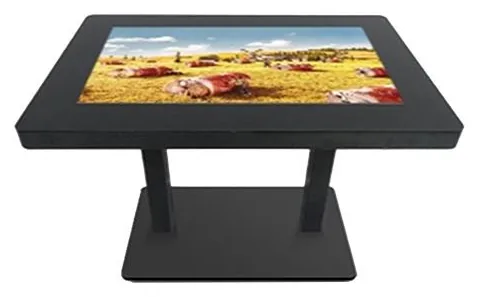
  • Interactive touch tables

    A table-style screen suits site plans that groups gather round, for example in a visitor centre or showroom.

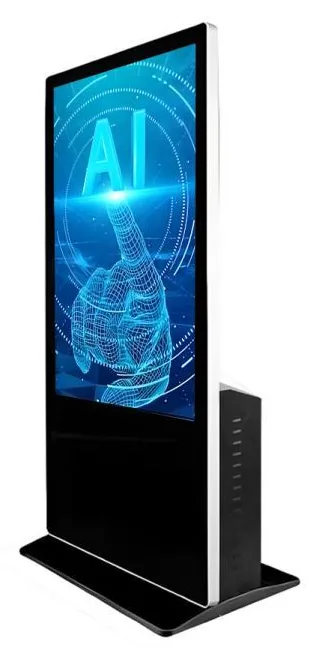
  • AI interaction kiosks

    Large-format kiosks with a camera and microphone, for projects that want to explore spoken or avatar-led guidance. The assistant software would be developed for the project. It is not a ready-made product.

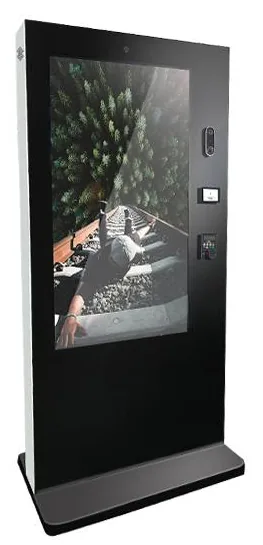
  • Outdoor displays with touch

    Touch is listed as an option for the outdoor display range, so an outdoor directory or site map can be assessed. IP65 is stated for that range and confirmed for the selected model.

Accessibility as a design consideration

We treat these as design considerations on every wayfinding project. They are not a claim of compliance with any standard.
  • Reach heights: search, keyboard and route controls where a seated visitor can reach them, or a lowered layout at one touch.
  • Contrast: strong contrast between text, routes and the map background, with glare and screen angle checked on site.
  • Text size: labels legible from a normal standing position, with an option to enlarge them.
  • Never colour alone: routes and zones marked with shapes, labels or patterns as well.
  • Step-free routes held in the map data, so the route offered is one the visitor can actually use.

Keeping data current, in every language

A wayfinding screen is judged on whether it is right. Decide who owns the directory, where the master copy lives, and how a tenant move, a renamed department or a closed lift reaches the screen. We scope an editing tool or a data import so that your own staff can make routine changes without a developer. Redrawing maps for a new floor or building is design work.

Multilingual content multiplies the upkeep. Every label, destination and instruction has to be translated and maintained in each language, and longer words or right-to-left scripts affect the layout. Start with the languages your visitors actually use.

Questions to settle before we quote

  • How many buildings, floors and destinations need to be covered?
  • Where will the screens stand, and is any position outdoors?
  • Do you have floor plans we can work from, and who signs off the maps?
  • Where does directory data live today, and who will maintain it?
  • Which languages are needed at launch?
  • Should the screen show live information such as room bookings or opening times?
  • Will each kiosk have a network connection, or must it work from locally stored data?

What this includes — and what it does not

What is and is not included

Kiosk Craft supplies and configures the hardware, and designs and builds wayfinding software around your site. Hardware, software development and ongoing management are quoted separately. Map artwork, translation and data entry are included only where your quotation says so.

No finished wayfinding platform is implied. Links to a room-booking, tenant or transport information system depend on the agreed scope and on what the third party makes available.

Hardware that fits

Product families that suit the applications on this page. Options are confirmed with your quotation.
  • Information and wayfinding kiosks

    All-in-One Information Kiosks

    All-in-one touchscreen kiosks from 21.5 to 98 inch in lectern, totem and wall-mounted forms, for wayfinding, directories, check-in and information points.

    • 21.5 to 98 inch
    • Indoor
    • Freestanding / Wall-mounted
    • Touchscreen
    View Options : All-in-One Information Kiosks
  • Touch tables

    Interactive Touch Tables

    A touchscreen set flat into a table, so several people can gather round one display. Sizes, height and touch technology are confirmed for your project.

    • Indoor
    • Table format
    • Touchscreen
    View Options : Interactive Touch Tables
  • AI interaction kiosks

    AI Interaction Kiosks

    Large-format 43, 49 and 55 inch touchscreen terminals with camera and microphone options, built to host conversational applications scoped around your business.

    • 43 to 55 inch
    • Indoor
    • Freestanding
    • Touchscreen
    View Options : AI Interaction Kiosks
  • Outdoor advertising displays

    Outdoor Advertising Displays

    Outdoor advertising screens from 21.5 to 98 inch in totem, wall and portable forms, with high-brightness panels and cooling options set for each model.

    • 21.5 to 98 inch
    • Outdoor
    • Wall-mounted / Freestanding / Ceiling-hung
    • Touch optional
    View Options : Outdoor Advertising Displays

Guides to read next

Frequently asked questions

Can our staff update the directory without a developer?

That should be a requirement from the start. We scope an editing tool or a data import so that routine changes, such as a new tenant or a renamed room, can be made by your own team. Changes to the map drawings themselves are design work.

Does a wayfinding kiosk need an internet connection?

It depends on the scope. A directory and maps can run from data stored on the kiosk and update when a connection is available. Live information, such as room bookings, needs a connection to the system that holds it.

Can a wayfinding screen be used outdoors?

It can be assessed. Touch is listed as an option for the outdoor display range, and IP65 is stated for that range and confirmed for the selected model. Sunlight readability and use with gloves should be part of the discussion.

Plan a wayfinding project

Tell us about your site, your visitors and where directory information lives today. We will recommend suitable screens and scope the directory and map software separately.