Mounts and peripherals
Display Mounts & Integration Accessories
Wall, ceiling, floor, wheeled and video-wall mounting options, matched to the display you select. Compatibility is confirmed per project.
- Wall-mounted / Ceiling-hung / Freestanding
Product range
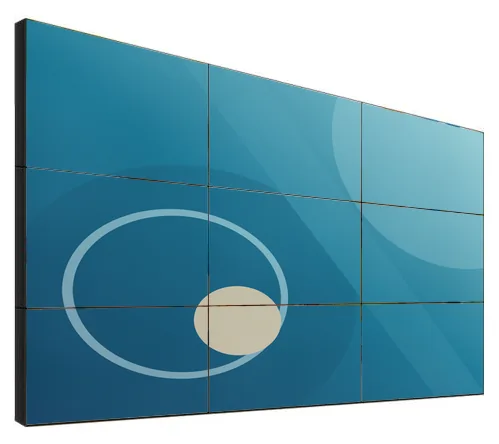
A video wall is the answer when one screen is not big enough: a feature wall in a showroom, a reception that needs presence, a venue where everyone has to see the same thing. It is also a small project rather than a single product. The panels, the mounting, the signal equipment and the content all have to be planned together, starting from the wall you have and how far away people will stand.
LCD Video Walls (view the range) are built from 46, 49, 55, 65 or 75 inch panels, with Full HD (1920 × 1080) or 4K panel options at 500 or 700 nits. Example layouts run from 2 × 2 and 3 × 3 up to 5 × 6 and 4 × 8. Narrow-bezel options are catalogue-stated at 0.88 mm, 1.7/1.8 mm and 3.5 mm, and whether those figures describe the panel edge or the combined join between two panels is confirmed with your quotation. Whichever you choose, the joins between panels remain visible as a fine grid across the image.
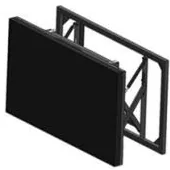
Walls can be fixed with wall brackets, including a pop-up style, or stood on a floor-standing frame or cabinet. Processor and matrix options for HDMI, DVI and VGA sources decide how the picture is spread across the panels, and a DisplayPort daisy-chain option is available. Display Mounts & Integration Accessories (view the range) cover the supporting hardware, and digital signage content management explains how content can be scheduled. Hardware, installation and software are quoted separately.
Catalogue
Showing all 2 products
Mounts and peripherals
Wall, ceiling, floor, wheeled and video-wall mounting options, matched to the display you select. Compatibility is confirmed per project.
Video walls
Narrow-bezel LCD panels from 46 to 75 inch, tiled into video walls with wall, cabinet, floor-stand or pop-out mounting and a processor matched to your sources.
Where they fit
A wall of screens behind a counter or at the back of a showroom draws people in and carries campaigns that change with the season. Example layouts include 2 × 2 and 3 × 3.
Example application: a welcome wall that mixes brand films, visitor messages and live information in separate zones, using a processor to divide the picture.
Example application: one large shared picture for screenings and events, with the option to split the wall between several sources when different content is needed at once.
Example application: several data sources shown side by side on one wall for an operations team. The number of sources, switching and resolution are decided with the processor or matrix specification.
Example application: a wall on a floor-standing frame for an exhibition stand, where fixing to the building is not possible. Transport, assembly and alignment need planning for each event.
Example application: timetable, wayfinding and advertising content sharing one wide display in a concourse, each in its own zone.
Choosing
The same wall area can be built from a few large panels or from many small ones. Fewer, larger panels mean fewer joins across the picture and fewer devices to mount and align. More, smaller panels give more freedom in the overall shape. Layouts from 2 × 2 to 4 × 8 are examples rather than a fixed list, and strips and portrait columns are also pictured. Tell us the wall dimensions and we will suggest layouts.
Every LCD video wall shows a grid of fine lines where the panels meet. Narrower bezels make the lines thinner; they do not remove them. The catalogue-stated options are 0.88 mm, 1.7/1.8 mm and 3.5 mm. It is not confirmed whether those figures are measured at the panel edge or across the combined join, so we confirm the basis with your quotation. Good content design keeps faces and small text away from the joins.
Both options are for indoor walls. The brighter option helps in rooms with strong daylight or bright retail lighting. Neither is intended to face out through a shop window in direct sun: for that, see high-brightness shop window displays.
Fixed wall brackets are the simplest choice where the wall can carry the load. Pop-up style brackets bring a panel forward from the wall, which helps with access in a tightly packed grid. A floor-standing frame or a cabinet suits walls that cannot take fixings, and temporary installations. Mounting hardware is specified together with the wall.
The signal equipment decides what the wall can show. A processor spreads one picture across all the panels or divides the wall into zones. A matrix switches several sources between screens. A DisplayPort daisy chain passes one signal from panel to panel for simpler walls. HDMI, DVI and VGA options are listed. The right choice depends on your sources and content, and is confirmed with your quotation.
Beyond the hardware
Applications and management tools are designed and built per project, then quoted separately from the hardware.
Hardware, software and services combined around a job you need done.
Questions
Yes. An LCD video wall is made of separate panels, and the bezels where they meet show as a fine grid across the image. Narrow-bezel panels make those lines thinner but never remove them, and how noticeable they are depends on the viewing distance and the content. From across a showroom the picture reads as one image; close up, the lines are clear. If an unbroken image is essential, tell us, and we will talk through whether an LCD wall is the right technology for the job.
The catalogue-stated narrow-bezel options are 0.88 mm, 1.7/1.8 mm and 3.5 mm. It is not stated whether these are measured at the edge of a single panel or across the combined join between two adjacent panels, and the difference matters when you compare walls. We confirm the measurement basis for the chosen panel with your quotation rather than guess.
Example layouts are 2 × 2, 3 × 3, 4 × 4, 3 × 4, 5 × 6 and 4 × 8, built from 46, 49, 55, 65 or 75 inch panels. They are examples, not a fixed list: strips of panels in a row and portrait columns are also pictured. Creative arrangements, such as rotated or staggered panels, are project options that we assess, because they affect the mounting and the signal processing. Send us the wall dimensions and the viewing distance and we will propose layouts.
Four things. Mounting: wall brackets, a floor-standing frame or a cabinet. Signal equipment: a processor, a matrix or a daisy-chain arrangement to get the picture onto the panels. A content source: a media player or PC, and a way to schedule what it shows. And installation: alignment is what makes a wall look right, so it is worth planning properly. Each part is listed separately in the quotation. See display mounts and integration accessories and installation and roll-out.
An interactive touch solution is listed as an option for the range. We treat it as a project option to assess, because it depends on the layout, the panel size and the software that will run on the wall. If touch is central to the idea, tell us what people should be able to do and we will confirm what is practical. For smaller surfaces, a single large interactive whiteboard can be a simpler route.
Both are listed. The panel resolution is only one part of the picture: the resolution of the whole wall also depends on the processor and on the source that feeds it. For a wall seen from a distance and showing video, Full HD (1920 × 1080) panels are often enough. For close viewing, fine text or detailed dashboards, 4K panels and a suitable processor are worth discussing. Content then needs to be produced at a resolution that suits the wall.
Describe what the screen needs to do and where it will go. We will recommend the right hardware and software and confirm the configuration in a written quotation.