KioskCraft
Your enquiry

Self-service kiosks

AI interaction kiosks for conversational applications

Large touchscreen kiosk hardware with a built-in camera, microphone and graphics PC, for bespoke interactive applications.
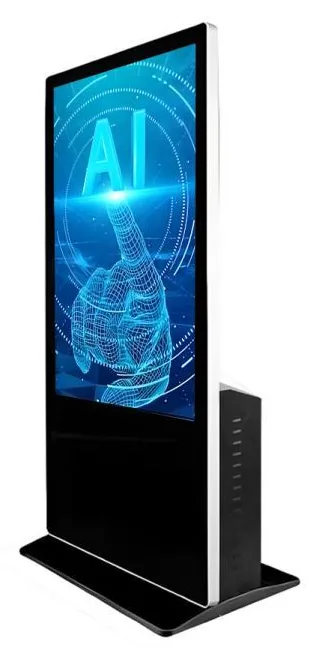
Black freestanding AI interaction kiosk seen from the rear quarter, showing the portrait touchscreen and the ventilated PC housing on the back

Some jobs are better done by talking than by tapping through menus: greeting a visitor, answering the same ten questions, guiding someone to the right product. An AI interaction kiosk is the hardware for that kind of application. It is a large upright touchscreen with a camera and microphone built in, and a PC powerful enough to drive demanding graphics such as an animated on-screen host.

AI Interaction Kiosks (view the range) are recommended at 43, 49 and 55 inch, with a built-in camera in 5 or 8 megapixel options, a noise-reduction microphone, a touchscreen and a high-performance graphics PC configuration running Windows. Full HD or 4K-class options are listed, and the exact resolution is confirmed for your configuration. Bespoke project builds are supported.

What you are buying here is hardware. No AI assistant software, voice service or subscription is included. The application, the knowledge it draws on, the way it hands over to your staff and any link to your sales or booking systems are scoped as a separate software project. See AI-assisted sales management software and bespoke kiosk software for how we approach that.
Catalogue

Products in this category

Each product family covers several designs and sizes. Open a family to see its options and stated specifications, or add it to your enquiry and tell us what you need.

One product family in this category

  • AI interaction kiosks

    AI Interaction Kiosks

    Large-format 43, 49 and 55 inch touchscreen terminals with camera and microphone options, built to host conversational applications scoped around your business.

    • 43 to 55 inch
    • Indoor
    • Freestanding
    • Touchscreen
    View Options : AI Interaction Kiosks

Where they fit

Suitable applications

Typical uses for the products in this category, drawn from the catalogue. The configuration for your site is confirmed with your quotation.
  • Virtual reception and concierge

    Example application: an on-screen host greets visitors, answers common questions by voice and notifies the right member of staff. The conversation design and the hand-over to staff are part of the software scope.

  • Guided selling in showrooms

    Example application: the kiosk asks a customer what they need, narrows the range and passes a qualified enquiry to your sales team. This is the kind of project our AI-assisted sales management software work is scoped around.

  • Visitor questions at attractions and venues

    Example application: visitors ask about exhibits, facilities or what is on, and get a spoken and on-screen answer drawn from content you control.

  • Interactive brand experiences at events

    Example application: an animated character or product demonstration that responds to people on an exhibition stand. The graphics PC configuration is what makes richer real-time visuals practical.

  • Multilingual help points

    Example application: a help point where visitors choose a language and ask for directions or service information. Languages and content are agreed as part of the software scope.

Choosing

How the options differ

The decisions that separate one option from another, and what each one depends on.
  1. Step 1

    AI interaction kiosk or standard information kiosk

    An information kiosk is a touchscreen computer for maps, directories and menus. An AI interaction kiosk adds the camera, microphone and graphics PC that speech-led or avatar-style applications need. If your application is touch-only, the information kiosk is the simpler choice. If you want people to speak to it, or you need demanding real-time graphics, start here.

  2. Step 2

    Choosing between 43, 49 and 55 inch

    All three recommended sizes are large upright screens. The 55 inch option gives the largest on-screen host and reads well from further away in an open foyer. The 43 inch option takes less floor space and suits a reception or shop where people stand close. Whichever you choose, keep the touch controls in the lower part of the screen so they stay within reach.

  3. Step 3

    Camera and microphone options

    The camera is listed in 5 and 8 megapixel options and the microphone is described as noise-reducing. What they are used for is decided by the software: for example, waking the screen when someone approaches, or capturing speech for a voice assistant. We do not offer the camera for identity verification. If the application processes images or voice, privacy notices and consent are planned as part of the project.

  4. Step 4

    Hardware scope and software scope

    The kiosk, its PC specification and its finish are the hardware scope, confirmed with your quotation. The assistant application, any speech or AI service it relies on, its content and its integrations are the software scope, quoted separately. Where an application depends on an online service, the terms and running costs of that service are set out in the software discussion, not bundled with the kiosk.

  5. Step 5

    Processing on the kiosk or online

    The graphics PC configuration allows heavier work to run on the kiosk itself, such as rendering an animated host. Speech and language features may run on the kiosk or through an online service, depending on the design. That choice affects the network connection the site needs and how data is handled, so it is settled early in the software scope.

Beyond the hardware

Software and solutions that go with these products

Software scoped around these products

Applications and management tools are designed and built per project, then quoted separately from the hardware.

Solutions that use them

Hardware, software and services combined around a job you need done.

Questions

AI interaction kiosks: frequently asked questions

Does the kiosk come with an AI assistant?

No. The AI interaction kiosk is hardware: a large touchscreen with a built-in camera, a noise-reduction microphone and a high-performance graphics PC configuration. No assistant software, voice service or subscription is included with it. The conversational application is scoped as a separate project around what you want it to do, the content it may draw on and how it hands over to your staff. See AI-assisted sales management software and bespoke kiosk software.

What can the camera and microphone be used for?

That is decided in the software scope. Example uses are waking the screen when someone approaches, capturing speech for a voice-led assistant, or a video call to a member of staff. The hardware being present does not mean the software for any of these already exists; each is designed and built for the project. We do not offer the camera for identity verification. Where images or voice are processed, the privacy notice, consent and data handling are planned with you as part of the project.

Which screen sizes and resolutions are offered?

The recommended sizes are 43, 49 and 55 inch. Full HD or 4K-class options are listed for the range, and the exact resolution is confirmed for your configuration with your quotation. The PC specification, including the graphics configuration, memory and storage, is confirmed in the same way and chosen to suit the application.

Does an AI interaction kiosk need an internet connection?

It depends on how the application is designed. An assistant that relies on an online speech or AI service needs a dependable connection, and the application should be designed to behave sensibly if the connection drops. An application that runs entirely on the kiosk may only need a connection for updates and reporting. The network options for your configuration are confirmed with your quotation, and the connection requirement is settled in the software scope.

Can it connect to our CRM or sales system?

That can be scoped. Passing an enquiry, a booking or a conversation summary to your CRM or sales system is an integration, and it depends on what your system allows. We agree the data to be passed, the direction it flows and who owns it before development starts, and the work is quoted as part of the software project, subject to the agreed integration. See integrations.

Can we run an ordinary touchscreen application on it?

Yes. It is a Windows touchscreen PC kiosk, so a touch application built for that platform can run on it, subject to the supported platform version confirmed with your quotation. If touch is all you need, though, an information kiosk is usually the simpler choice, because you would not be using the camera, microphone or graphics configuration.

Tell us what you need

Describe what the screen needs to do and where it will go. We will recommend the right hardware and software and confirm the configuration in a written quotation.