KioskCraft
Your enquiry

Self-service kiosks

Information and wayfinding kiosks

Large-format touch kiosks for directories, maps, visitor information and product lookup, in wall, floor and table formats.
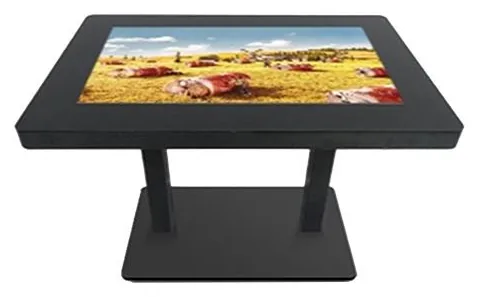
White freestanding all-in-one information kiosk with a large angled landscape touchscreen on a curved K-shaped pedestalBlack interactive touch table with a large landscape touchscreen set into a flat top, standing on twin pedestal legs

An information kiosk answers the questions people would otherwise ask a member of staff: where is it, what is on, which floor, how do I get there. The hardware decision follows from how the screen will be read. A map viewed by a family from a couple of steps back needs a large screen; a staff directory used by one person at a time does not. Then decide where it goes: standing in a concourse, fixed to a wall by the lifts, or built into a table.

All-in-One Information Kiosks (view the range) list screen options of 21.5, 32, 42, 49, 55, 65, 75, 85 and 98 inch, with 10-point infrared or PCAP touch, a metal housing with an aluminium alloy frame and tempered glass front, an anti-theft lock, Windows or Android configurations and Wi-Fi or wired (LAN) networking. Wall-mounted, floor-standing and touch-table formats are available, and which sizes are offered in which format is confirmed with your quotation. For the table format see Interactive Touch Tables (view the range).

The kiosk is a touchscreen computer. What makes it a wayfinding point is the software and the content: maps, directories, search and the way information is kept up to date. We scope that around your site and quote it separately from the hardware. See wayfinding for how a project is put together.

Catalogue

Products in this category

Each product family covers several designs and sizes. Open a family to see its options and stated specifications, or add it to your enquiry and tell us what you need.

Showing all 2 products

  • Information and wayfinding kiosks

    All-in-One Information Kiosks

    All-in-one touchscreen kiosks from 21.5 to 98 inch in lectern, totem and wall-mounted forms, for wayfinding, directories, check-in and information points.

    • 21.5 to 98 inch
    • Indoor
    • Freestanding / Wall-mounted
    • Touchscreen
    View Options : All-in-One Information Kiosks
  • Touch tables

    Interactive Touch Tables

    A touchscreen set flat into a table, so several people can gather round one display. Sizes, height and touch technology are confirmed for your project.

    • Indoor
    • Table format
    • Touchscreen
    View Options : Interactive Touch Tables

Where they fit

Suitable applications

Typical uses for the products in this category, drawn from the catalogue. The configuration for your site is confirmed with your quotation.
  • Building directories and floor guides

    Example application: a tenant or department directory beside the lifts or in reception, searchable by name and floor. A portrait totem or wall-mounted unit suits list-based content.

  • Wayfinding across large sites

    Example application: step-by-step routes across a hospital, campus, shopping centre or transport interchange. Route logic, step-free options and map artwork are part of the software scope.

  • Visitor information

    Example application: opening times, events, exhibits and local information at an attraction or visitor centre, with a language switch. Languages and content are agreed as part of the software scope.

  • Product lookup in showrooms

    Example application: customers browse the full range, compare options and send a shortlist to a member of staff. This can be scoped alongside AI-assisted sales management software where the kiosk feeds your sales process.

  • Shared browsing at a touch table

    Example application: a table-format touchscreen where several visitors explore a map, a development plan or a collection together. Exact table configurations are confirmed with your quotation.

Choosing

How the options differ

The decisions that separate one option from another, and what each one depends on.
  1. Step 1

    Lectern, totem, wall or table

    The family is pictured in four forms: a lectern with an angled landscape screen, an upright portrait totem, a wall-mounted touchscreen and a touch table. Lecterns suit maps and search because the screen is angled towards the user. Totems suit lists and directories and are easy to spot from a distance. Wall units save floor space. Tables suit groups.

  2. Step 2

    Infrared or PCAP touch

    Both are stated as 10-point touch for the family. Infrared touch uses sensors in the frame around the glass and responds to a finger, a gloved hand or a stylus. PCAP touch works through a flush glass front, much like a tablet. Which is offered depends on the size and format you choose, and is confirmed with your quotation.

  3. Step 3

    Information kiosk or ordering kiosk

    No printer, scanner or payment bracket is listed for the information kiosk family. If people need to print a ticket, scan a code or pay, start from the freestanding ordering range instead, or tell us the requirement and we will assess whether it can be added as a custom build.

  4. Step 4

    Choosing a screen size

    Size the screen to the content and the viewing distance, not to the space available. Around 21.5 to 32 inch suits one person searching a directory at arm's length. Around 42 to 55 inch suits maps that two or three people read together. The largest options work as landmark screens in big halls, where part of the screen sits above comfortable reach and the touch controls need to be kept low.

  5. Step 5

    Windows or Android

    Both are listed for the family. The right one depends on the software: an application built for one platform will not run on the other. If you have existing software, tell us what it needs. If we are building it, we agree the platform with you. The supported platform version is confirmed with your quotation.

Beyond the hardware

Software and solutions that go with these products

Software scoped around these products

Applications and management tools are designed and built per project, then quoted separately from the hardware.

Solutions that use them

Hardware, software and services combined around a job you need done.

Questions

Information and wayfinding kiosks: frequently asked questions

Is wayfinding or directory software included?

No. The kiosk is hardware: a touchscreen computer in a wall-mounted, floor-standing or table enclosure. The wayfinding or directory application is scoped around your site, including the maps, the search, the routes and how the content is kept up to date, and it is quoted separately. If you already have an application that runs on Windows or Android, tell us what it needs and we will confirm a matching configuration. See wayfinding and bespoke kiosk software.

Which screen sizes and formats are available?

The family lists 21.5, 32, 42, 49, 55, 65, 75, 85 and 98 inch options, in wall-mounted, floor-standing and touch-table formats. A list of sizes does not mean every size is offered in every format, so your quotation confirms the sizes available for the format you want. Touch technology, infrared or PCAP, is confirmed in the same way.

Can the kiosk show promotions when nobody is using it?

Yes, this can be scoped. A common pattern is a loop of promotions or announcements that gives way to the directory as soon as someone touches the screen. It is a software feature rather than a hardware one, so it is agreed as part of the application. How that content is scheduled and updated is also part of the software scope: see digital signage content management.

How do we keep the information up to date?

Decide this before the application is built, because it shapes the design. Simple directories can be edited by your own staff through an agreed editing screen; larger sites may draw tenant, room or event data from a system you already run, subject to the agreed integration. Wi-Fi or wired networking is listed for the family, so remote updates can be scoped where the site has a suitable connection. See kiosk management.

Can wheelchair users and people with limited reach use an information kiosk?

Both the enclosure and the software affect this. A lectern or a lower wall-mounted screen brings the whole touch area within reach, while a tall totem places part of the screen high up. In the application, the controls people need most are kept in the lower part of the screen, with clear contrast and large touch targets. We agree these requirements with you at the design stage rather than treating them as an afterthought.

Can an information kiosk have a printer, scanner or card terminal?

None of these is listed for the information kiosk family, so we do not offer them as standard options. If you need one, tell us and we will record it as a requirement to assess for a custom build. If printing, scanning or payment is central to the job, the ordering and payment kiosk range is usually the better starting point, because those options are stated for that range.

Tell us what you need

Describe what the screen needs to do and where it will go. We will recommend the right hardware and software and confirm the configuration in a written quotation.