KioskCraft
Your enquiry

Specialist displays

Transparent display showcases that keep the product in view

Display cabinets with a see-through screen, from 21.5 to 85 inch in Full HD, so graphics and video play in front of the real product.

At a glance

Product families
1
Screen sizes listed
21.5 to 85 inch
Environments
Indoor

Derived from the published specifications of the products in this category. Exact options are confirmed with your quotation.

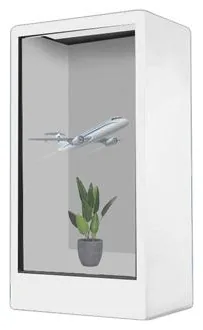
A transparent display showcase is a cabinet with a see-through screen for a front. The product sits inside; graphics, text and video play on the screen in front of it. Visitors see the real item and the story about it in the same glance, which is something neither a glass case nor an ordinary screen can do alone.

Transparent Display Showcases (view the range) are listed from 21.5 to 85 inch in Full HD (1920 × 1080), at 350 to 500 cd/m², with a tempered glass and metal construction in black, white or a custom colour. They are listed in horizontal and vertical formats, with a 2 × 5 W stereo audio output, and with infrared or capacitive touch available. Content can come from your own device over HDMI, from standalone playback, or from a built-in Android or Windows configuration.

Start with the product you want to show. Its size decides the size of cabinet, and its shape decides where graphics can sit without hiding it. Then decide how content will be looked after. A showcase at one exhibition can run a fixed loop. Showcases in several shops are easier to keep current with digital signage content management, scoped separately. Where visitors should explore by touch, the on-screen experience is a piece of bespoke kiosk software to scope.
Catalogue

Products in this category

Each product family covers several designs and sizes. Open a family to see its options and stated specifications, or add it to your enquiry and tell us what you need.

One product family in this category

Where they fit

Suitable applications

Typical uses for the products in this category, drawn from the catalogue. The configuration for your site is confirmed with your quotation.
  • Retail product launches

    Put a new product in the cabinet and let the screen explain what it is, what it does and why it is different.

  • Museum and heritage exhibits

    Show an object with labels, dates and animation appearing in front of it, without a separate panel beside the case.

  • Exhibition and trade stands

    Give a stand a focal point that stops visitors and starts conversations about the product inside.

  • Showrooms

    Example application: a showroom features a component, accessory or scale model in a showcase, with specifications playing on the screen.

  • Cosmetics, technology and gifts

    Small, well-packaged products suit showcases well, because the item stays visible while the screen carries the message.

Choosing

How the options differ

The decisions that separate one option from another, and what each one depends on.
  1. Step 1

    Transparent or holographic-style showcase

    Choose a transparent showcase when the cabinet will be viewed from the front and you want graphics to play across the product. Choose a holographic-style showcase when you want an animated image that appears to float beside the product and can be viewed from more than one side. The two are listed with similar brightness and playback options, so the decision is about the effect and the position.

  2. Step 2

    Start with the size of the product

    The range is listed from 21.5 to 85 inch, measured across the screen. What matters for your product is the space inside the cabinet, which is confirmed for the selected size with your quotation. Tell us the dimensions and weight of the item you want to display.

  3. Step 3

    Display only or touch

    Infrared or capacitive touch is listed as available. Without touch, the showcase plays a loop. With touch, visitors can choose what to see, such as features, colours or a short film, which needs an on-screen application as well as content. Specify it at the start.

  4. Step 4

    How content is supplied

    Four routes are listed: an HDMI monitor driven by your own device, standalone playback, or a built-in Android or Windows configuration. HDMI suits an exhibition where you bring a laptop or player. A built-in platform suits a permanent showcase, particularly with content management.

  5. Step 5

    Horizontal or vertical cabinet

    Both formats are listed. A horizontal cabinet suits wide or low items. A vertical cabinet suits tall items and narrow floor space. The orientation also sets the shape of the content, so decide it before design work starts.

Beyond the hardware

Software and solutions that go with these products

Questions

Transparent display showcases: frequently asked questions

How does a transparent showcase work?

The front of the cabinet is a see-through screen. Graphics and video play on it while the product remains visible behind, so visitors look through the content to the item itself. Content is designed with that in mind: some areas carry graphics and others are left clear so the product is not hidden.

What sizes do transparent showcases come in?

The range is listed from 21.5 to 85 inch in Full HD. The individual sizes on offer, the internal space of each cabinet and the outline dimensions are confirmed with your quotation.

Does the showcase have sound?

A stereo audio output of 2 × 5 W is stated for the range. Whether speakers are fitted inside the cabinet, or the output is there to drive external speakers, is confirmed for the selected model. For a noisy exhibition hall, think about whether the content should rely on sound at all.

Can visitors interact with the showcase?

Infrared or capacitive touch is listed as available, so the screen can respond to touch. The interactive experience itself is software that has to be designed and built around your product. We scope that as bespoke kiosk software, quoted separately from the hardware.

What kind of content works best?

Content made for the showcase and the product inside it: short, bold graphics, product names and features, and animation that frames the item and does not cover it. A standard advert tends to hide the product. If you need help, see design and branding.

Where should a transparent showcase be positioned?

Indoors, and away from direct sunlight, since the range is listed at 350 to 500 cd/m², an indoor brightness level. It needs a power socket, a level floor or counter, and a network connection if content will be updated over a network.

Tell us what you need

Describe what the screen needs to do and where it will go. We will recommend the right hardware and software and confirm the configuration in a written quotation.