Mounts and peripherals
Display Mounts & Integration Accessories
Wall, ceiling, floor, wheeled and video-wall mounting options, matched to the display you select. Compatibility is confirmed per project.
- Wall-mounted / Ceiling-hung / Freestanding
Components & accessories
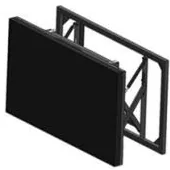
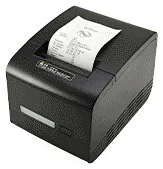
A display is only as good as the way it is fixed, and a kiosk is only as useful as the devices built into it. Mounts and peripherals are the unglamorous parts of a project, and the parts most likely to cause a delay on installation day if nobody has checked that they fit.
Display Mounts & Integration Accessories (view the range) bring together the mounting options listed across our display families: floor stands and ceiling fixings for shop window displays, fixed and wheeled stands for freestanding displays, wall brackets, floor-standing brackets and cabinets for LCD video walls, and wall mounts or movable stands for interactive whiteboards. Ordering Peripherals (view the range) cover the devices listed for ordering kiosks: 80 mm thermal receipt printers, QR code scanners with an NFC reader option, payment-terminal brackets and kitchen printers, with cash or coin acceptors, card dispensers, cameras and microphones as custom-build options.
Nothing here is universal. A mount is matched to a particular display, and a peripheral to a particular kiosk design and to the software that will use it. A printer or scanner that the application does not support is just a box with a cable. We confirm compatibility for the selected equipment with your quotation, and peripheral support is covered when we scope bespoke kiosk software or software integration.
Catalogue
Showing all 2 products
Mounts and peripherals
Wall, ceiling, floor, wheeled and video-wall mounting options, matched to the display you select. Compatibility is confirmed per project.
Mounts and peripherals
Printers, scanners, NFC readers, card-terminal brackets and custom modules for ordering kiosks — compatible options chosen per design, not universal fittings.
Where they fit
Choose a floor stand style for a shop window display, or a fixed or wheeled stand for an indoor freestanding display.
Support an LCD video wall on wall brackets, including a pop-out style, or on a floor-standing bracket or cabinet.
Move an interactive whiteboard between classrooms or meeting rooms on a movable stand instead of fixing it to one wall.
Equip an ordering kiosk with an 80 mm thermal printer and a QR code scanner, where the kiosk design includes them.
Hold the card terminal from your payment provider on the side or front of a kiosk, where the bracket suits that terminal model.
Choosing
Each display family lists its own mounting options, and an option shown for one family is not assumed for another. The size and weight of the screen, the fixing pattern and the surface it fixes to all matter. We match the mount to the selected display and confirm it with your quotation.
A fixed stand or bracket suits a permanent position. A wheeled stand suits displays and whiteboards that move between rooms. A pop-out style wall bracket is listed for video walls. Choose by how the equipment will be used and serviced after installation, not only by how it looks on day one.
A payment-terminal bracket holds a terminal; it does not include one, and it is not assumed to fit every model. Card terminals are supplied by your payment provider unless separately agreed. An NFC reader reads compatible cards and tags; by itself it does not mean the kiosk can accept bank-card payments.
A printer, scanner or reader only works if the kiosk application is written to use it. Hardware capability does not prove that the integration exists. Peripheral support is agreed when the software is scoped, and restaurant print timing, for example, is configurable to suit your kitchen.
Beyond the hardware
Applications and management tools are designed and built per project, then quoted separately from the hardware.
Hardware, software and services combined around a job you need done.
Questions
It might, but compatibility is matched to specific equipment, so we do not assume it. Send us the make and model, the screen size and weight, and the pattern of mounting holes on the back, and tell us what it will be fixed to. We will say whether a listed mount is suitable or needs to be assessed.
No. A bracket is a holder. The card terminal comes from your payment provider unless separately agreed, and a terminal shown in a product picture is not part of the supply. Bracket fit depends on the terminal model, so tell us which one you use or plan to use.
Not by itself. An NFC reader can read compatible cards and tags, for example for loyalty or membership, where the software supports it. Accepting bank-card payments needs a payment terminal and service from a payment provider, plus the agreed software integration. See payment kiosks.
It depends on the kiosk design. Many kiosk enclosures are built with their printer and scanner positions from the start, and an enclosure without those openings cannot easily gain them. If you think you may need a peripheral later, say so in your enquiry so the right design is chosen at the outset.
Floor stands generally need assembly and a level floor. Wall and ceiling fixings need a structure that can carry the load and fixings suited to it, which should be checked by a competent installer. Installation is planned with you under installation and rollout.
Describe what the screen needs to do and where it will go. We will recommend the right hardware and software and confirm the configuration in a written quotation.