
Countertop kiosks
Countertop Ordering Kiosks
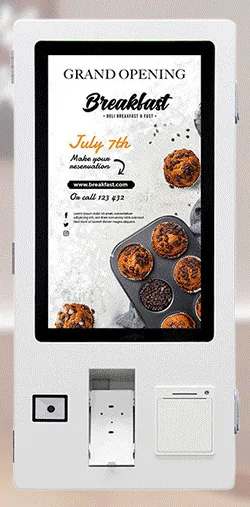
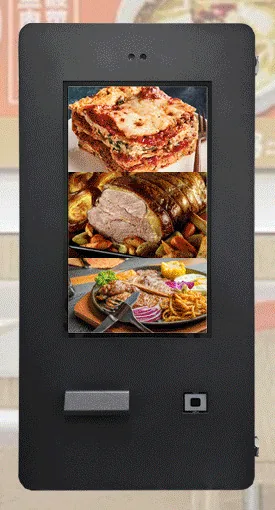
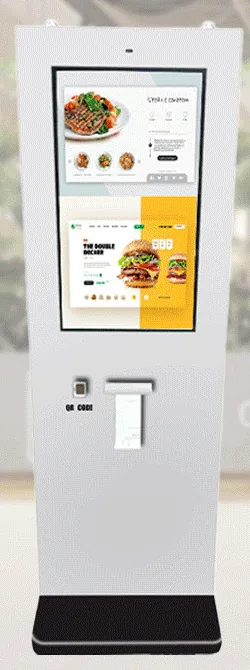
Compact self-service ordering terminals for counters and reception desks. Nine designs with 15.6, 21.5 and 24 inch screen references.
- 15.6 to 24 inch
- Indoor
- Countertop
- Touchscreen
Mounts and peripherals
Family reference Ref KC-R04
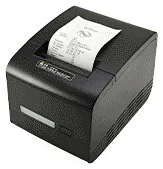
Peripherals decide what an ordering kiosk can actually do: print a receipt, read a voucher, hold a card terminal. We select them for the kiosk design you choose, confirm each one with your quotation, and scope the software support they need.
Quote-led, not a checkout: we confirm the configuration, price and lead time in your quotation.
Overview
A touchscreen on its own can take an order, but most ordering points need more than that: a receipt or an order ticket, a way to read a voucher or a collection code, somewhere secure to mount the card terminal. Those jobs are done by peripherals built into the kiosk enclosure, and the right set depends on how your service runs.
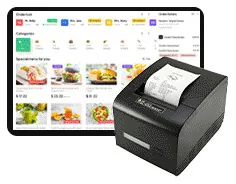
Across the ordering range, the stated peripherals are an 80 mm thermal receipt printer with an easy paper-change design, a QR code scanner — with barcode reading also described — and a bracket for a card terminal. The scanner can be specified with a 13.56 MHz NFC reader function. A standalone kitchen ticket printer appears in the restaurant configurations we illustrate. Cash or coin acceptance, card dispensing, OCR, a camera and a microphone are described as custom-build options.
None of these is fitted to every kiosk. Each enclosure design has its own positions and cut-outs: some designs are pictured with a printer, scanner and front cradle, some with a side bracket, and a few with no printer at all. So we treat peripherals as compatible options, check them against the design you choose, and confirm what is fitted with your quotation. A card terminal is never part of the supply — it comes from your payment provider — and an NFC reader is not card-payment acceptance.
A device that is fitted still has to be supported by the software. A scanner does nothing until the ordering software acts on what it reads, and a printer needs a ticket layout. Where we scope the software, device support is part of that work; where you bring your own, we assess it as part of the integration. Peripherals are normally specified with a kiosk from our countertop, wall-mounted, freestanding or outdoor ranges; requests to add them to a kiosk you already own are assessed case by case.
Suitable applications
An 80 mm thermal printer in the kiosk gives the customer a receipt or an order number to take to the collection point. The ticket layout is set in the ordering software.
A QR code scanner can read a code from a phone or a printed voucher, for example to apply an offer or to find a pre-paid order. What happens next is decided by your software.
The optional NFC reader function reads 13.56 MHz cards and tags, for example a staff card in a workplace restaurant. It identifies the card; it does not take a bank-card payment.
A bracket or cradle holds the card terminal supplied by your payment provider, at the side of the screen or on the front depending on the design. Bracket fit is assessed for your terminal model.
A standalone ticket printer in the kitchen prints orders for the team, either alongside a kitchen display or on its own. When a ticket prints is agreed in the software scope.
Cash or coin acceptance, card dispensing, OCR, cameras and microphones are custom-build options, for example a kiosk that issues a membership card. Each is assessed as a project.
Key features
An inbuilt 80 mm thermal printer with an easy paper-change design is stated for the ordering range. Roll size, cutter type and the fitted position are confirmed with your quotation.
A standalone kitchen printer appears in all three restaurant configurations we illustrate. Its model and paper width are confirmed with your quotation.
An inbuilt QR code scanner is stated for the ordering range, and barcode reading is also described. Tell us which code types you need to read so that they can be confirmed.
The scanner can be specified with a 13.56 MHz NFC card reader function. It reads cards and tags your software supports. It does not make the kiosk accept bank cards.
A payment-terminal bracket is stated for the range, and a bracket at the side or on the front is stated for the outdoor freestanding kiosks. A bracket does not prove that every terminal model fits, so yours is assessed.
A camera and a microphone can be built in as custom options. Tell us what they are for — any use involving images or audio of people needs to be planned with your privacy obligations in mind.
Cash or coin acceptance and card dispensing are described as custom-build options. They need space, secure access and software support, so they are assessed against the enclosure as a project.
OCR reading is listed as a custom-build option for the range. What it needs to read, and how the result is used, is scoped with the software.
Every fitted device needs the kiosk software to drive it. We include device support when we scope the software, and assess it when you bring your own.
Configuration options
Choose what you know and leave the rest. Catalogue options are pictured or stated for this range; anything else is recorded as a requirement for us to assess.
How many units this configuration is for (1 to 9,999).
Anything that helps us assess this item, for example where it will go or what it must connect to. Please do not include personal or payment details.
0 of 1,000 characters
No options chosen yet. You can add the item as it is and we will cover the details with you.
Quantity: 1 · 8 of 8 option groups left blank - we cover them in your quotation.
Adding an item builds your enquiry list. It is not an order or a checkout. We confirm the configuration, price and lead time in your quotation.
Ordering Peripherals
Qty 1 · no options chosen yet
Technical specifications
How to read the markers
Where an attribute is not listed, it is not specified for the range. That never means the feature is absent.
Reads NFC cards and tags. It is not card-payment acceptance
Assessed against the chosen enclosure
Assessed against the chosen enclosure
Compatible options — inclusion depends on the chosen kiosk design and configuration
Available as a project option
Roll size and cutter are confirmed with your quotation
Model and paper width are confirmed with your quotation
Code types are confirmed with your quotation
Terminal not included. Bracket fit is assessed for your terminal model
Stated, optional and confirmed
Compatible software and services
Installation considerations
Peripherals are specified with the kiosk, so that positions, cut-outs and cabling suit the enclosure. Tell us everything the kiosk needs to do before the design is fixed.
Adding a device to a kiosk you already own needs an assessment of the enclosure, the power available and the ports on its computer.
Plan who changes paper rolls and where spares are kept. Roll size for the fitted printer is confirmed with your quotation.
Give us the make and model of your card terminal early. Your payment provider may also have requirements for power, network and mounting.
If a camera or microphone is fitted, plan signage and data handling with whoever is responsible for privacy in your organisation.
Test every device with your real vouchers, cards and menu before go-live. Device testing can be planned as part of our installation and rollout service.
Related products
Countertop kiosks
Compact self-service ordering terminals for counters and reception desks. Nine designs with 15.6, 21.5 and 24 inch screen references.
Wall-mounted kiosks
Wall-mounted self-service ordering kiosks that keep the floor clear. Four enclosure designs with 15.6, 21.5, 24 and 32 inch screen references.
Freestanding kiosks
Freestanding self-service ordering kiosks in fourteen enclosure styles, from slim pole stands to full-height towers, with 15.6 to 32 inch screen references.
Outdoor kiosks
Wall-mounted ordering and payment kiosks from the outdoor range. Five enclosed designs with 15.6, 21.5, 24 and 32 inch screen references.
Outdoor kiosks
Freestanding outdoor ordering and payment kiosks with 21.5 and 32 inch screen references, including canopy designs on bolt-down pedestals.
A kitchen touchscreen that shows incoming orders from kiosks and tills. Hardware and software are scoped together, with or without a kitchen ticket printer.
Frequently asked questions
No. They are compatible options rather than universal fittings. A printer, a scanner and a card-terminal bracket are stated features of the ordering range, but each enclosure design has its own positions, and some designs are pictured without one or more of them. What is fitted to your kiosk is confirmed with your quotation.
Sometimes. It depends on whether the enclosure has a position for the device, and on the power and ports available inside. Send us the details of your kiosk and we will assess it. We would rather tell you it is not practical than sell you a part that does not fit.
No. The NFC reader function reads 13.56 MHz cards and tags, such as loyalty, membership or staff cards, where your software supports them. Contactless bank-card payments are taken by the payment terminal from your payment provider.
It needs checking. A bracket does not prove compatibility with every provider or terminal model, so we ask for your terminal make and model and assess the fit before quoting. The terminal itself is supplied by your payment provider, not by us.
The stated printer is an 80 mm thermal type, so it takes 80 mm wide thermal paper rolls. The roll diameter and core size for the printer fitted to your kiosk are confirmed with your quotation.
Not automatically. A fitted device still needs the kiosk software to drive it — to act on a scanned code or to lay out a ticket. Where we scope the software, device support is part of that work. Where you bring your own software, we assess it as part of the integration, which is described and quoted separately.
Add it to your enquiry with the options you know, or ask for advice. We recommend the right configuration and confirm it in a written quotation.