KioskCraft
Your enquiry

Mounts and peripherals

Kiosk Craft Display Mounts & Integration Accessories

Family reference Ref KC-C04

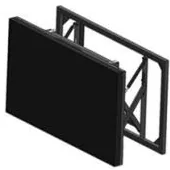
Line illustration of a pop-up wall-mount bracket with a video wall panel hinged forward for service access
Example design and example on-screen content shown

The bracket, stand or cabinet that holds a display is chosen with the display, not after it. This range gathers the mounting options referenced across our display ranges, so that the fixing, the screen and the site are specified as one job.

  • Wall-mounted / Ceiling-hung / Freestanding
Product sheet

Quote-led, not a checkout: we confirm the configuration, price and lead time in your quotation.

Also listed under Video walls.

Overview

About this range

Kiosk Craft Display Mounts & Integration Accessories covers the mounting hardware referenced across the display catalogues: wall brackets, pop-out service brackets, cabinets and floor stands for video walls; ceiling hangers and a choice of floor stands for shop-window displays; wall mounts and wheeled stands for interactive whiteboards; and floor or wheeled stands for freestanding advertising displays.

Each of those options is shown for a particular display range. A mount shown for one product is not assumed to fit another. Size, weight, fixing pattern, cable routes and the surface it fixes to all have to match, so we quote mounts against the specific display you have selected. A mount for a display you already own is recorded as a requirement for us to assess.

Load ratings, materials and dimensions are not printed in the catalogues. We confirm them for the selected mount and display with your quotation. The wall, ceiling or floor itself has to be checked on site before anything is fixed to it.

Mounting is one part of a display project. The screen, the content software, for example digital signage content management, and the fixings are planned together, and installation and rollout can be scoped where you want the work co-ordinated across several sites.

Suitable applications

Where this range fits

Example applications. The software and integrations behind each one are scoped for the project.

Key features

What this range offers

Stated features are printed for the range; optional ones are available on request. Neither means every design includes the item.

Configuration options

Configure and add to your enquiry

Choose what you know and leave the rest. Catalogue options are pictured or stated for this range; anything else is recorded as a requirement for us to assess.

Equipment to be mountedChoose one

Mounting options are listed against particular display ranges, so start with what is being mounted.

Mounting typeTick all that apply

Choose as many as apply. Options not listed for your equipment are recorded for us to assess.

How many units this configuration is for (1 to 9,999).

Anything that helps us assess this item, for example where it will go or what it must connect to. Please do not include personal or payment details.

0 of 1,000 characters

Your selections

No options chosen yet. You can add the item as it is and we will cover the details with you.

Quantity: 1 · 2 of 2 option groups left blank - we cover them in your quotation.

Adding an item builds your enquiry list. It is not an order or a checkout. We confirm the configuration, price and lead time in your quotation.

Request advice

Technical specifications

Specifications

Family-level information from the catalogue. Values that depend on the design or configuration are confirmed with your quotation.

How to read the markers

Stated
Printed for this range in the catalogue. Range-level statements do not mean every design includes the item.
Optional
Described as an option or a custom build for the range, available on request.
Confirmed at quotation
Not fixed for the range. We confirm it for your configuration in your quotation.
To be confirmed
The catalogue information is unclear, so we check it before quoting.

Where an attribute is not listed, it is not specified for the range. That never means the feature is absent.

Installation

Mounting
Wall, ceiling, floor-standing and wheeled mounting options are referenced across the display rangesStated

Each option is listed for specific equipment — nothing is universal, and compatibility is confirmed with your quotation

Construction and finish

Dimensions
Dimensions and fixing details are confirmed for the selected mount with your quotationConfirmed at quotation

Other

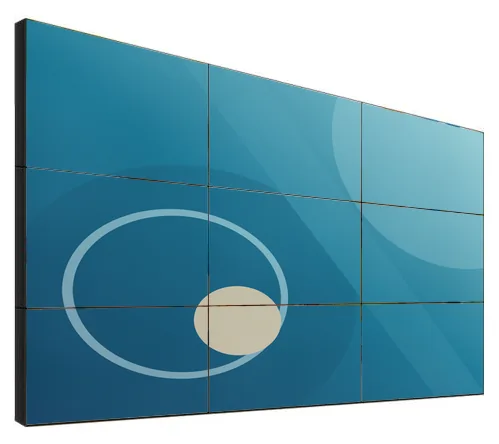
Video-wall mounting
Wall-mount bracket with a pop-out style available, floor-standing bracket or cabinetStated

Matched to the selected display — confirmed with your quotation

Shop-window display mounting
Ceiling-mount or floor-standing installation, with a variety of floor standsStated

Matched to the selected display — confirmed with your quotation

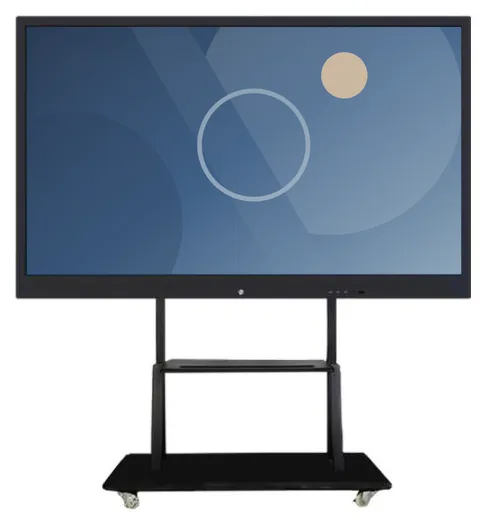
Whiteboard mounting
Wall mount or movable standStated

Matched to the selected display — confirmed with your quotation

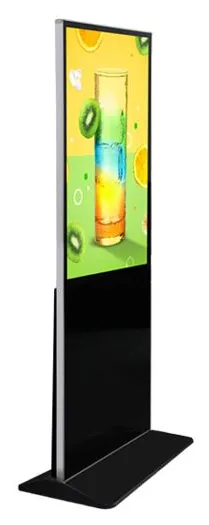
Freestanding display stands
Floor stand or stand with wheelsStated

Matched to the selected display — confirmed with your quotation

Load rating
Not printed in the catalogues — confirmed for the selected mount and display with your quotationConfirmed at quotation

Stated, optional and confirmed

What is stated, what is optional, and what we confirm

Range-level statements do not mean every design includes every item. Missing information is not specified, never assumed.

Stated for this range

  • Video walls: wall-mount bracket, floor-standing bracket and cabinet installation
  • Shop-window displays: ceiling-mount or floor-standing installation, with a variety of floor stands
  • Interactive whiteboards: wall mount or movable stand
  • Freestanding advertising displays: floor stand or stand with wheels

Available as options

  • Pop-out service bracket for video walls
  • Wheeled stands where the display range lists them
  • Installation and rollout, scoped and quoted separately

Confirmed with your quotation

  • Compatibility of each mount with the selected display model, size and weight
  • Load rating, materials and dimensions of the selected mount
  • Fixing pattern and adjustment range
  • Cable management and service access
  • Castor type and braking on wheeled stands
  • Finish and colour
  • Suitability of the wall, ceiling or floor, checked on site before installation
  • Whether a mount can be supplied for a display you already own

Compatible software and services

Software, solutions and services

Software is scoped and developed per project and quoted separately from the hardware.

Installation considerations

Planning the installation

  1. Choose the mount with the display. We quote mounting hardware against a specific display model, size and weight.

  2. Have the wall, ceiling or floor checked before installation. The structure has to carry the combined weight of the display and mount with a suitable margin.

  3. Video walls need an accurate, level fixing surface. Pop-out brackets need clear space in front of the wall so that a screen can be drawn forward for service.

  4. Ceiling-hung window displays need confirmed fixing points above the window and a safe cable route.

  5. Wheeled stands need level floors, and the display height should be set so that the unit stays stable when it is moved.

  6. Installation can be scoped as part of the project, or carried out by your own contractor working from confirmed drawings.

Frequently asked questions

Questions about display mounts & integration accessories

Will these mounts fit any display?

No. Nothing in this range is universal. Each mounting option is listed against a particular display range, and size, weight, fixing pattern and cable routes all have to match. We quote mounts against the specific display you select and confirm compatibility with your quotation.

Can you supply a mount for a screen we already own?

Possibly. We record it as a requirement to assess rather than assuming a fit. Send us the make and model of the display, its weight, its rear fixing pattern and where it will be installed, and we will tell you what can be supplied.

What is a pop-out video-wall bracket?

It is a wall bracket that lets an individual screen be drawn forward from the wall, so that it can be serviced or replaced without dismantling the screens around it. The catalogue lists it as available for the video wall range. It needs clear space in front of the wall, and the details are confirmed for your layout.

Do you publish load ratings?

The catalogues do not print load ratings, materials or dimensions for mounts and stands, so we do not quote figures on this page. They are confirmed for the selected mount and display with your quotation.

Do you install the mounts?

Installation and rollout can be scoped separately, which suits multi-site work where fixing, cabling and commissioning need co-ordinating. Alternatively your own contractor can install from confirmed drawings. Your quotation sets out what is and is not included.

What about price, lead time and warranty?

Kiosk Craft is quote-led. The price, lead time, warranty and support terms are set out in the quotation. Mounts are normally quoted with the display they are matched to.

Ready to talk about this range?

Add it to your enquiry with the options you know, or ask for advice. We recommend the right configuration and confirm it in a written quotation.