Touch tables
Interactive Touch Tables
A touchscreen set flat into a table, so several people can gather round one display. Sizes, height and touch technology are confirmed for your project.
- Indoor
- Table format
- Touchscreen
Interactive displays
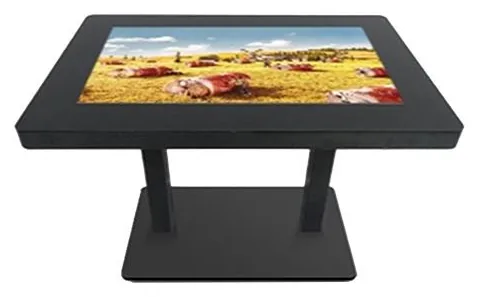
A touch table turns a screen into furniture. People stand or sit around it, several at a time, and explore content together: a map, a product range, a development plan. That makes it a different decision from an upright kiosk. Think about who gathers around it, how long they stay, whether they sit or stand, and what they should walk away knowing.
Interactive Touch Tables (view the range) are the table format of our all-in-one touch kiosk family. Stated for that family are 10-point infrared or PCAP touch, a metal housing with an aluminium alloy frame and tempered glass front, Windows or Android configurations and Wi-Fi or wired (LAN) networking. The family lists screen options from 21.5 to 98 inch, but which sizes are offered as a table, along with the table height, leg design and touch technology, is confirmed with your quotation.
A table needs software designed for a table. Content has to make sense from more than one side, and more than one person may be touching it at once. We design and build that application around your content and quote it separately from the hardware: see bespoke kiosk software.
Catalogue
One product family in this category
Touch tables
A touchscreen set flat into a table, so several people can gather round one display. Sizes, height and touch technology are confirmed for your project.
Where they fit
Example application: customers and a salesperson explore a range, configure options and compare finishes around one surface. The outcome can be passed to your sales process where AI-assisted sales management software is part of the project.
Example application: visitors explore a map, a timeline or a collection together, each opening the items that interest them.
Example application: buyers explore a site plan, plots and floor plans with a sales adviser in a marketing suite.
Example application: a large shared map in a visitor hub or campus reception, where a group plans a route together rather than queuing at an upright kiosk.
Example application: a small group of pupils or trainees work on the same activity from different sides of the table.
Choosing
A table invites a group to linger; an upright kiosk serves one person quickly. Tables take more floor area and work best where people have time, such as showrooms, visitor centres and waiting areas. For quick, single-user tasks such as finding a room or checking in, an upright information kiosk is the better fit.
The table format is listed as part of the all-in-one touch kiosk family, and one table design is pictured: a black top on twin legs. The family specification is stated, but table sizes, height, finish and touch technology are not broken out separately. Treat them as items that your quotation confirms, and tell us early if you have a fixed size or height in mind.
Both are listed for the family. On a horizontal surface the difference matters more than on a wall. Infrared touch can register anything that crosses the sensors at the edge of the screen, such as a sleeve or an object placed on the glass, while PCAP responds to fingers on a flush glass top. Which is available for a table configuration is confirmed with your quotation.
An application built for an upright screen rarely works well flat. Table content needs to be readable from more than one side, to cope with several people touching at once, and to reset itself when a group walks away. These are software design decisions, scoped with you before any development starts.
Beyond the hardware
Applications and management tools are designed and built per project, then quoted separately from the hardware.
Hardware, software and services combined around a job you need done.
Questions
The touch table is listed as a format of the all-in-one touch kiosk family, and that family lists screen options of 21.5, 32, 42, 49, 55, 65, 75, 85 and 98 inch. A list of sizes for the family does not mean every size is offered as a table, so the sizes available in table form are confirmed with your quotation, along with the table height and overall dimensions. Tell us how many people should be able to use it at once and we will suggest a starting point.
10-point touch is stated for the family, so the screen can register several touches at once. Whether that becomes a good multi-user experience depends on the software: the application has to be designed so that two or three people can each open, move and close items without getting in the way of the others. That is part of the software scope, and worth describing in your first enquiry.
No spill, ingress or impact rating is stated for the touch table, so we do not describe it as suitable for food and drink service. A tempered glass front is stated for the family, but that is not the same as a rated, sealed surface. If the table will be used where drinks are present, tell us, and we will confirm what the chosen configuration is specified for before you order.
Windows or Android configurations are listed for the family, and the supported platform version is confirmed with your quotation. The table is supplied as hardware; the application is scoped separately. If you already have a touch application, tell us which platform it needs. If not, we design and build one around your content: see bespoke kiosk software.
The design pictured is black. Other colours, printed graphics and changes to the form of the table are requirements that we assess for the project, rather than listed options. See design and branding.
Describe what the screen needs to do and where it will go. We will recommend the right hardware and software and confirm the configuration in a written quotation.