KioskCraft
Your enquiry

Touch tables

Kiosk Craft Interactive Touch Table

Family reference Ref KC-K09

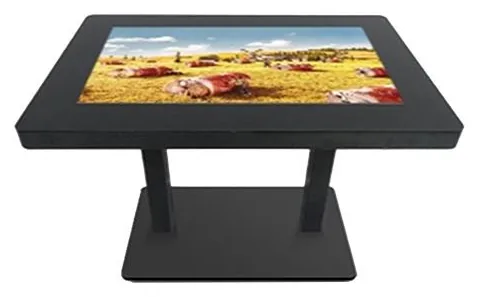
Black interactive touch table with a large landscape touchscreen set into a flat top, standing on twin pedestal legs
Example design and example on-screen content shown

A touch table turns a screen into a shared surface. People stand or sit around it, explore a plan, a map or a product range together and talk as they go. The table form comes from our all-in-one touchscreen range, and the exact configuration is confirmed with your quotation.

  • Indoor
  • Table format
  • Touchscreen
Product sheet

Quote-led, not a checkout: we confirm the configuration, price and lead time in your quotation.

Also listed under Information and wayfinding kiosks.

Overview

About this range

The Kiosk Craft Interactive Touch Table is a touchscreen laid flat in a table top. The catalogue shows one table: a black top with a landscape screen set into it, carried on two legs above a flat base plate. It belongs to the same all-in-one range as the All-in-One Information Kiosk, where the computer sits inside the enclosure.

We are careful about what is known. The catalogue states that a touch-table model is available within the all-in-one range, and pictures it, but it does not give the table its own specification. The wider range lists screen sizes from 21.5 to 98 inch, 10-point infrared or projected capacitive touch, and Android or Windows configurations. Which of those apply to the table — and its height, top dimensions and glass — are confirmed with your quotation.

That makes the first conversation a practical one. Tell us who will use the table, whether they will sit or stand, how many people should be able to use it at once and what it will show. We use that to confirm a configuration rather than ask you to pick from a list that the catalogue does not support.

A table is only as useful as the application on it. Multi-user product explorers, site plans, maps and exhibits are developed through bespoke kiosk software, and hardware and software are quoted separately.

Suitable applications

Where this range fits

Example applications. The software and integrations behind each one are scoped for the project.

Key features

What this range offers

Stated features are printed for the range; optional ones are available on request. Neither means every design includes the item.

Design options

One design is pictured for this range

Each design is a different enclosure or format. Availability for your size and configuration is confirmed with your quotation.

Configuration options

Configure and add to your enquiry

Choose what you know and leave the rest. Catalogue options are pictured or stated for this range; anything else is recorded as a requirement for us to assess.

Approximate screen sizeChoose one

The catalogue does not say which sizes are offered as a table, so every choice here is recorded as a requirement for us to confirm.

Table base and heightChoose one

Touch technologyChoose one

Both are listed for the wider range. The technology used in table form is confirmed with your quotation.

Operating platformChoose one

Both are listed for the wider range. The supported platform and version for the table are confirmed with your quotation.

Finish and brandingTick all that apply

Software requirementTick all that apply

Software is scoped and quoted separately from the hardware.

How many units this configuration is for (1 to 9,999).

Anything that helps us assess this item, for example where it will go or what it must connect to. Please do not include personal or payment details.

0 of 1,000 characters

Your selections

No options chosen yet. You can add the item as it is and we will cover the details with you.

Quantity: 1 · 6 of 6 option groups left blank - we cover them in your quotation.

Adding an item builds your enquiry list. It is not an order or a checkout. We confirm the configuration, price and lead time in your quotation.

Request advice

Technical specifications

Specifications

Family-level information from the catalogue. Values that depend on the design or configuration are confirmed with your quotation.

How to read the markers

Stated
Printed for this range in the catalogue. Range-level statements do not mean every design includes the item.
Optional
Described as an option or a custom build for the range, available on request.
Confirmed at quotation
Not fixed for the range. We confirm it for your configuration in your quotation.
To be confirmed
The catalogue information is unclear, so we check it before quoting.

Where an attribute is not listed, it is not specified for the range. That never means the feature is absent.

Display

Orientation
Landscape-format screen laid flat in the table top, as picturedStated

Touch and interaction

Touch
TouchscreenStated
Touch technology
10-point infrared or projected capacitive touch is listed for the wider range. The technology used in table form is confirmed with your quotationConfirmed at quotation

Installation

Mounting
Table format on two legs above a flat base plate, as picturedStated
Environment
Indoor useConfirmed at quotation

No weather protection is stated, so we treat this range as indoor equipment. Suitability for your location is confirmed with your quotation

Platform and connectivity

Operating platform
Android or Windows configurations are listed for the wider range — the supported platform and version for the table are confirmed with your quotationConfirmed at quotation
Connectivity
Wi-Fi and wired LAN are listed for the wider range. Confirmed for the table with your quotationConfirmed at quotation

Construction and finish

Construction
A metal housing, aluminium alloy frame and tempered glass front are listed for the wider range. Table-top glass and surface protection are confirmed with your quotationConfirmed at quotation
Dimensions
Table height, top dimensions and clearance under the top are confirmed with your quotationConfirmed at quotation
Finish
Pictured in blackStated

Colour options are confirmed with your quotation

Other

Screen sizes
The sizes offered in table form are confirmed with your quotation. The wider all-in-one range spans 21.5 to 98 inchConfirmed at quotation

Confirmed with your quotation

Stated, optional and confirmed

What is stated, what is optional, and what we confirm

Range-level statements do not mean every design includes every item. Missing information is not specified, never assumed.

Stated for this range

  • A touch-table model is available within the all-in-one touchscreen range
  • Pictured as a black table with a landscape screen set into the top
  • Pictured on two legs above a flat base plate

Available as options

  • Infrared or projected capacitive touch, as listed for the wider range and confirmed for the table
  • Android or Windows configuration, as listed for the wider range and confirmed for the table
  • A different table height or base style, assessed per project
  • Custom colour or printed branding, assessed per project
  • Multi-user applications, scoped and quoted separately

Confirmed with your quotation

  • Which screen sizes are offered in table form
  • Table height, top dimensions and clearance under the top
  • Touch technology and the number of touch points in table form
  • Glass type, surface protection and resistance to spills
  • The load the table top is designed to carry
  • The supported Android or Windows version, processor, memory and storage
  • Display resolution, brightness and viewing angle when seen from the side
  • Network connections, which are listed as Wi-Fi and wired LAN for the wider range
  • Power entry point and cable route to the table
  • Whether the anti-theft lock stated for the wider range applies to the table

Compatible software and services

Software, solutions and services

Software is scoped and developed per project and quoted separately from the hardware.

Software

Solutions

Services

Installation considerations

Planning the installation

  1. The table stands on a level indoor floor. Allow room for people to gather on the sides you want them to use.

  2. Plan the power and network route early. A floor box under the table avoids a trailing cable; where that is not possible we can advise on cable protection.

  3. Overhead lighting reflects strongly in a horizontal screen. Check the position under the actual lighting before fixing it.

  4. Decide whether users will sit or stand, and whether wheelchair users need to approach with their knees under the top. It determines the height we confirm.

  5. Until surface protection is confirmed, treat the top as a display rather than furniture: no drinks, and nothing heavy placed on it.

  6. Delivery, positioning and commissioning are covered under installation and rollout and are set out in the quotation.

Frequently asked questions

Questions about interactive touch tables

What sizes and heights are available?

The catalogue confirms that a touch-table model exists within the all-in-one range, which spans 21.5 to 98 inch, but it does not say which sizes are offered as a table or give a height. Tell us roughly how large the surface should be and whether people will sit or stand, and we will confirm the size and height with your quotation.

Can several people use the table at the same time?

Ten-point touch is listed for the wider range, and a table is a natural place for shared use. How well that works depends on two things: the touch technology confirmed for the table, and an application designed for more than one user. We consider both when we scope the project.

Is the surface protected against spills and knocks?

A tempered glass front is listed for the wider range. Nothing is stated about sealing, spill resistance or the load the top can carry, so we confirm these with your quotation. Until then, plan to use the table as a display rather than as a place for drinks.

Is software included?

No. The table is hardware. Applications for shared use, such as site plans, product explorers and exhibits, are developed around your requirements as bespoke kiosk software and quoted separately.

How is the table powered and connected?

It needs a mains supply at the table position. Wi-Fi and wired LAN are listed for the wider range and are confirmed for the table with your quotation. A floor box beneath the table gives the tidiest result, so it is worth raising with your fit-out team early.

Ready to talk about this range?

Add it to your enquiry with the options you know, or ask for advice. We recommend the right configuration and confirm it in a written quotation.