KioskCraft
Your enquiry

Information and wayfinding kiosks

Kiosk Craft All-in-One Information Kiosk

Family reference Ref KC-K08

White freestanding all-in-one information kiosk with a large angled landscape touchscreen on a curved K-shaped pedestal
Example design and example on-screen content shown

A touchscreen and computer in one enclosure, offered as an angled lectern, a portrait totem or a wall-mounted screen. It is the hardware for an information point: a directory, a map, a visitor check-in or a product browser, with the software scoped around what your visitors need to do.

  • 21.5 to 98 inch
  • Indoor
  • Freestanding / Wall-mounted
  • Touchscreen
Product sheet

Quote-led, not a checkout: we confirm the configuration, price and lead time in your quotation.

Also listed under Interactive displays, Wall-mounted kiosks, Freestanding kiosks.

Overview

About this range

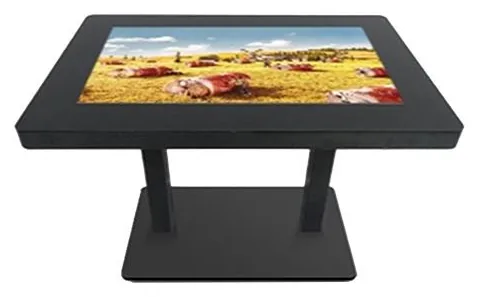
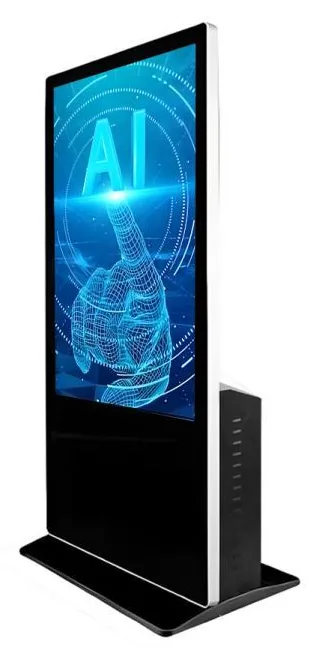
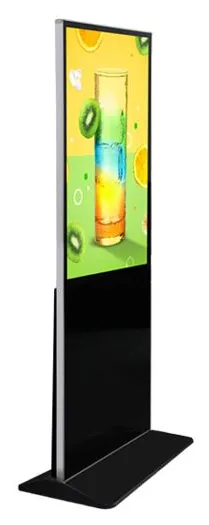
The Kiosk Craft All-in-One Information Kiosk combines the screen, the touch sensor and the computer in a single enclosure, so there is no separate PC to house. The range is listed in nine screen sizes from 21.5 to 98 inch and is shown in three forms: an angled lectern on a sculpted pedestal, a tall portrait totem and a wall-mounted landscape screen. A touch-table form from the same range is covered by the Interactive Touch Table.

The range is described with 10-point touch in infrared (IR) or projected capacitive (PCAP) versions, a metal housing with an aluminium alloy frame and a tempered glass front, an anti-theft lock, and Wi-Fi and wired network connections. Android or Windows configurations are available — the supported platform version is confirmed with your quotation.

Not every size suits every form. A 98 inch screen makes sense on a wall or as a large totem, not on a lectern, and the catalogue does not set out which sizes are offered in which form. We confirm the combination you need with your quotation rather than assume it.

This range is pictured without printers, scanners or payment brackets. If visitors need to pay, print or scan, tell us. We will either assess adding the peripheral or point you to the ordering and payment kiosks, which are designed around them.

The kiosk is the hardware half of the project. Directories, maps, visitor check-in and product browsers are developed through bespoke kiosk software, with links to your data handled under integrations, subject to the agreed integration. Hardware and software are quoted separately.

Suitable applications

Where this range fits

Example applications. The software and integrations behind each one are scoped for the project.

Key features

What this range offers

Stated features are printed for the range; optional ones are available on request. Neither means every design includes the item.

Design options

Three designs are pictured for this range

Each design is a different enclosure or format. Choose one to set it in the configurator below; size options and peripheral positions are confirmed with your quotation.

Configuration options

Configure and add to your enquiry

Choose what you know and leave the rest. Catalogue options are pictured or stated for this range; anything else is recorded as a requirement for us to assess.

FormChoose one

Three forms are pictured. Size availability differs by form and is confirmed with your quotation. For a table, see the Interactive Touch Table.

Screen sizeChoose one

All nine sizes are listed for the range, but not every size suits every form.

OrientationChoose one

Pictured in landscape for the lectern and wall forms, and in portrait for the totem.

Touch technologyChoose one

Both are listed as 10-point options. Availability depends on the size and form.

Operating platformChoose one

The supported platform version is confirmed with your quotation.

Network connectionTick all that apply

PrinterChoose one

Not described for this range. Select it if visitors need a ticket, badge or receipt and we will assess it.

ScannerChoose one

Not described for this range. Select it if visitors need to scan a QR code or barcode and we will assess it.

Finish and brandingTick all that apply

Software requirementTick all that apply

Software is scoped and quoted separately from the hardware.

How many units this configuration is for (1 to 9,999).

Anything that helps us assess this item, for example where it will go or what it must connect to. Please do not include personal or payment details.

0 of 1,000 characters

Your selections

No options chosen yet. You can add the item as it is and we will cover the details with you.

Quantity: 1 · 10 of 10 option groups left blank - we cover them in your quotation.

Adding an item builds your enquiry list. It is not an order or a checkout. We confirm the configuration, price and lead time in your quotation.

Request advice

Technical specifications

Specifications

Family-level information from the catalogue. Values that depend on the design or configuration are confirmed with your quotation.

How to read the markers

Stated
Printed for this range in the catalogue. Range-level statements do not mean every design includes the item.
Optional
Described as an option or a custom build for the range, available on request.
Confirmed at quotation
Not fixed for the range. We confirm it for your configuration in your quotation.
To be confirmed
The catalogue information is unclear, so we check it before quoting.

Where an attribute is not listed, it is not specified for the range. That never means the feature is absent.

Display

Screen sizes
21.5, 32, 42, 49, 55, 65, 75, 85 and 98 inchStated

Size availability differs by form and is confirmed with your quotation

Orientation
Pictured in landscape (lectern and wall forms) and in portrait (totem form)Stated

Orientation depends on the form chosen

Touch and interaction

Touch
10-point touchscreenStated
Touch technology
10-point infrared (IR) or projected capacitive (PCAP) touchStated

Confirmed for the selected size and form

Installation

Mounting
Floorstanding (lectern or totem) or wall-mountedStated

A touch-table form is covered by the Interactive Touch Table range

Environment
Indoor useConfirmed at quotation

No weather protection is stated, so we treat this range as indoor equipment. Suitability for your location is confirmed with your quotation

Platform and connectivity

Operating platform
Android or Windows configurations — the supported platform version is confirmed with your quotationStated
Connectivity
Wi-Fi or wired LANStated

Construction and finish

Construction
Metal housing with an aluminium alloy frame and a tempered glass frontStated
Security
Anti-theft lockStated

What the lock secures is confirmed for the selected form

Finish
Pictured in white (lectern) and in black (totem and wall-mounted screen)Stated

Colour options are confirmed with your quotation

Stated, optional and confirmed

What is stated, what is optional, and what we confirm

Range-level statements do not mean every design includes every item. Missing information is not specified, never assumed.

Stated for this range

  • Screen sizes of 21.5, 32, 42, 49, 55, 65, 75, 85 and 98 inch
  • 10-point touch in infrared (IR) or projected capacitive (PCAP) versions
  • Metal housing with an aluminium alloy frame and a tempered glass front
  • Anti-theft lock
  • Android or Windows configurations
  • Network connection over Wi-Fi or wired LAN
  • Wall-mounted, floorstanding and touch-table models

Available as options

  • Choice of infrared or projected capacitive touch, confirmed for the selected size
  • Choice of Android or Windows configuration
  • Custom colour or printed branding, assessed per project
  • Printer, scanner, card reader or camera, assessed per project
  • Wayfinding, directory or check-in software, scoped and quoted separately
  • Device monitoring and management, scoped and quoted separately

Confirmed with your quotation

  • Which screen sizes are offered in the lectern, totem and wall-mounted forms
  • Which touch technology is supplied for the selected size
  • The supported Android or Windows version, processor, memory and storage
  • Display resolution and brightness
  • What the anti-theft lock secures on the selected form
  • Colour options, dimensions, weight and power requirements
  • Floor fixing for freestanding forms and bracket details for wall mounting
  • Speakers and audio output, which the catalogue does not describe

Compatible software and services

Software, solutions and services

Software is scoped and developed per project and quoted separately from the hardware.

Software

Solutions

Services

Installation considerations

Planning the installation

  1. Lectern and totem forms stand on a level floor. Whether they need fixing down depends on the size and the location, and is confirmed with your quotation.

  2. Wall-mounted forms need a wall that can carry the weight of the screen, with power and network points placed behind or beside the unit.

  3. Every form needs a mains supply. A wired network connection is the more dependable choice for a permanent information point; Wi-Fi is also stated for the range.

  4. Set the screen height and angle with wheelchair users and shorter visitors in mind. We can advise during design.

  5. Avoid positions facing strong sunlight: brightness is not stated for this range and reflections reduce readability.

  6. Delivery, positioning, fixing and commissioning are covered under installation and rollout and are set out in the quotation.

Frequently asked questions

Questions about all-in-one information kiosks

What is the difference between IR and PCAP touch?

Infrared touch uses sensors in a frame around the edge of the screen and is common on larger sizes. Projected capacitive touch sits behind a flush glass front, much like a tablet. The catalogue lists both as 10-point options. Which one is supplied for a given size and form is confirmed with your quotation.

Is every screen size available as a lectern, a totem and a wall-mounted screen?

No, and the catalogue does not set out which sizes go with which form. Smaller and mid-sized screens suit a lectern, while the largest sizes are better on a wall or as a totem. Tell us the form and the rough size you have in mind and we will confirm the combination with your quotation.

Does the kiosk include wayfinding or directory software?

No. The kiosk is supplied as hardware with an Android or Windows configuration. Directories, maps, check-in and product browsers are developed around your requirements as bespoke kiosk software and quoted separately. See wayfinding and check-in for how the pieces fit together.

Should we choose Android or Windows?

It usually follows from the software. If you already have an application, its requirements decide the platform. If we are building the application for you, we recommend a platform as part of the scope. Either way, the supported platform version is confirmed with your quotation.

Can a printer, scanner or card reader be added?

These are not described for this range, so we do not promise them. Tell us what visitors need to do and we will assess whether the peripheral can be fitted. If the main job is ordering and payment, the freestanding ordering kiosks are designed around printers, scanners and payment-terminal brackets.

What does the anti-theft lock protect?

An anti-theft lock is stated for the range, without saying what it secures. We confirm this for the form you choose, along with any floor or wall fixings, as part of your quotation.

Ready to talk about this range?

Add it to your enquiry with the options you know, or ask for advice. We recommend the right configuration and confirm it in a written quotation.