KioskCraft
Your enquiry

Self-service kiosks

Freestanding self-service kiosks

Floor-standing kiosks for ordering, payment, information and interactive applications, placed where your customers are.
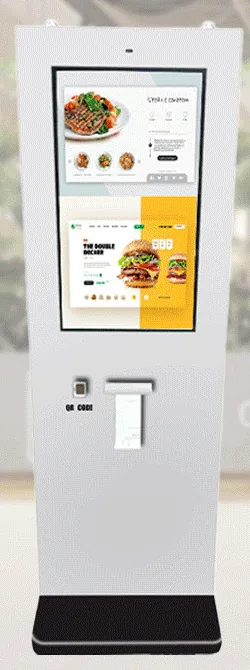
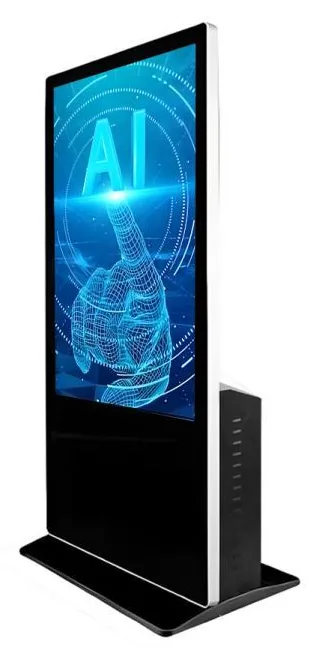
White freestanding ordering kiosk with a portrait touchscreen, scanner, card terminal and printer beneath it, on twin poles over a contoured baseBlack freestanding AI interaction kiosk seen from the rear quarter, showing the portrait touchscreen and the ventilated PC housing on the backWhite freestanding all-in-one information kiosk with a large angled landscape touchscreen on a curved K-shaped pedestalWhite outdoor freestanding payment kiosk in a tall slab enclosure with a portrait touchscreen, scanner and printer above a dark base

A freestanding kiosk goes where the customer is, rather than where the counter or the wall happens to be: inside the entrance, at the head of a queue, in a concourse or on a forecourt. That freedom comes with three practical questions. Is there floor space for the kiosk and the person using it without blocking a route? How will power and data reach the spot? And does the kiosk need fixing to the floor?

Four families stand on the floor. Freestanding Ordering Kiosks (view the range) are indoor transaction terminals pictured with 15.6 to 32 inch screens on pole stands, twin-pole stands, slab and tower bodies and lectern-style podiums. Outdoor Freestanding Payment Kiosks (view the range) are stated as IP65 for the range, confirmed per model. All-in-One Information Kiosks (view the range) are larger touchscreens for directories and wayfinding. AI Interaction Kiosks (view the range) add a camera, microphone and graphics PC for bespoke conversational applications.

The enclosure is chosen to fit the job the software has to do. An ordering kiosk needs a menu application and a route to your kitchen or till. An information kiosk needs content that someone can keep up to date. An AI interaction kiosk needs an assistant application, which is scoped separately. We quote hardware, software development and ongoing management as separate items.

Catalogue

Products in this category

Each product family covers several designs and sizes. Open a family to see its options and stated specifications, or add it to your enquiry and tell us what you need.

Showing all 4 products

  • Freestanding kiosks

    Freestanding Ordering Kiosks

    Freestanding self-service ordering kiosks in fourteen enclosure styles, from slim pole stands to full-height towers, with 15.6 to 32 inch screen references.

    • 15.6 to 32 inch
    • Indoor
    • Freestanding
    • Touchscreen
    View Options : Freestanding Ordering Kiosks
  • AI interaction kiosks

    AI Interaction Kiosks

    Large-format 43, 49 and 55 inch touchscreen terminals with camera and microphone options, built to host conversational applications scoped around your business.

    • 43 to 55 inch
    • Indoor
    • Freestanding
    • Touchscreen
    View Options : AI Interaction Kiosks
  • Information and wayfinding kiosks

    All-in-One Information Kiosks

    All-in-one touchscreen kiosks from 21.5 to 98 inch in lectern, totem and wall-mounted forms, for wayfinding, directories, check-in and information points.

    • 21.5 to 98 inch
    • Indoor
    • Freestanding / Wall-mounted
    • Touchscreen
    View Options : All-in-One Information Kiosks

Where they fit

Suitable applications

Typical uses for the products in this category, drawn from the catalogue. The configuration for your site is confirmed with your quotation.
  • Quick-service ordering

    Freestanding ordering kiosks inside the entrance take orders before customers reach the counter. Pole-stand and twin-pole designs are pictured in white and in black, with printer, scanner and payment-bracket options stated for the range.

  • Retail order and pay points

    Example application: customers order from an extended range or pay without queuing at the till. The product data, basket and payment flow are scoped as software, and any link to your retail system is subject to the agreed integration.

  • Forecourt, car park and drive-up payment

    Outdoor freestanding payment kiosks are intended for exposed positions. Example application: paying for parking or ordering from a vehicle lane, with the card terminal supplied by your payment provider.

  • Visitor information and wayfinding

    Large-format information kiosks in totem or lectern form show maps, directories and event information. Example locations include shopping centres, campuses, hospitals and transport buildings.

  • Check-in for hotels, clinics and offices

    Example application: a guest or visitor confirms a booking on arrival and staff are notified. The check-in journey and any booking-system link are part of a separate software scope.

  • Interactive assistants and brand experiences

    Example application: an on-screen host in a showroom that answers common questions by voice. AI interaction kiosks supply the hardware; the assistant itself is designed and quoted separately.

Choosing

How the options differ

The decisions that separate one option from another, and what each one depends on.
  1. Step 1

    Pole stands, slab bodies and podiums

    Slim pole and twin-pole stands carry the screen head on one or two uprights and look light on the shop floor. Slab and tower designs enclose everything in a single upright body, which gives more surface for branding. Podium and lectern designs present a landscape screen at an angle, closer to a desk. Sizes differ by design: the pictured designs run from 15.6 to 32 inch, and each has its own size options.

  2. Step 2

    Ordering kiosk or information kiosk

    Ordering kiosks are compact transaction terminals, with printer, scanner, NFC reader and payment-bracket options stated for the range. Information kiosks are larger touchscreens, listed from 21.5 to 98 inch, for content that people browse. If customers need to print or pay, start from the ordering range. If they need to read a map from a few steps away, start from the information range.

  3. Step 3

    Indoor or outdoor freestanding

    Indoor designs are for dry interiors only. The outdoor freestanding range is stated with an IP65 enclosure, a thermal printer, a QR scanner, a payment bracket on the side or front, and Android or Windows configurations. The rating is confirmed for the selected model with your quotation. Outdoor designs are pictured on pedestals with bolt-down bases, some with a canopy over the screen.

  4. Step 4

    Standard touch kiosk or AI interaction kiosk

    AI interaction kiosks are recommended at 43, 49 and 55 inch and include a camera, a noise-reduction microphone and a high-performance graphics PC configuration. Choose one only if the application needs speech, a camera or demanding graphics. For touch-only menus and maps, an ordering or information kiosk is the simpler choice.

  5. Step 5

    Fixed or movable

    Freestanding kiosks are placed once and wired in. If the screen needs to move through the day, or work away from a socket, see portable battery touchscreen displays.

Beyond the hardware

Software and solutions that go with these products

Software scoped around these products

Applications and management tools are designed and built per project, then quoted separately from the hardware.

Solutions that use them

Hardware, software and services combined around a job you need done.

Questions

Freestanding kiosks: frequently asked questions

Does a freestanding kiosk have to be fixed to the floor?

It depends on the design and the location. Outdoor freestanding designs are pictured on pedestals with bolt-down bases, and fixing is normal for anything outdoors or unattended. Indoors, the answer depends on the stand style, the floor and how busy the area is; tall, slim stands in public areas are usually better fixed. The fixing method for the chosen design is confirmed with your quotation and agreed with whoever is responsible for the floor.

How do power and data reach a kiosk in the middle of the floor?

Usually from a floor box beneath the kiosk, or from the nearest wall or column with the cable protected or hidden. It is worth settling this before choosing a position, because moving a kiosk a metre to reach an existing floor box is far simpler than cutting a new one. The network connection method for your configuration is confirmed with your quotation. See installation and roll-out for how we plan this with you.

What screen sizes do freestanding kiosks come in?

Freestanding ordering designs are pictured at 15.6, 21.5, 24, 27 and 32 inch, and each design has its own size options. The ordering range overall is stated from 15.6 to 43 inch, which does not mean every design is offered in every size. Outdoor freestanding designs are pictured at 21.5 and 32 inch. All-in-one information kiosks list options from 21.5 to 98 inch, and AI interaction kiosks are recommended at 43, 49 and 55 inch. Your quotation confirms the sizes available for your chosen design.

Is a card terminal included with a freestanding kiosk?

No. Card terminals are supplied by your payment provider unless we agree otherwise. Payment-terminal brackets are stated as an option for the ordering and payment range, mounted on the side or front depending on the design. A bracket does not prove that a particular terminal fits or that your provider supports it for self-service use, so we check the model before you order. An NFC reader, where fitted, reads NFC cards and tags and is not the same as accepting bank-card payments. See payment kiosks.

Can the kiosk be finished in our colours?

The ordering and payment range is stated in white or black, with other colours available as an option. Printed logos, vinyl graphics and header signs are project options that we assess for the chosen design, because panel shapes and materials differ between designs. See design and branding.

Tell us what you need

Describe what the screen needs to do and where it will go. We will recommend the right hardware and software and confirm the configuration in a written quotation.