Outdoor kiosks
Outdoor Wall-Mounted Payment Kiosks
Wall-mounted ordering and payment kiosks from the outdoor range. Five enclosed designs with 15.6, 21.5, 24 and 32 inch screen references.
- 15.6 to 32 inch
- Outdoor
- Wall-mounted
- Touchscreen
Self-service kiosks
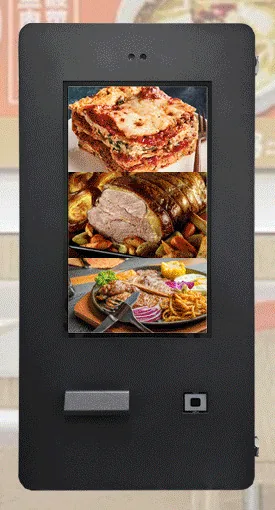
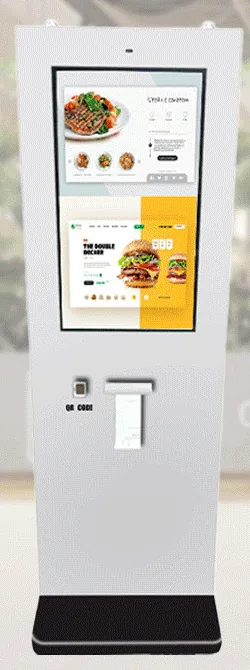
An outdoor kiosk has to cope with things an indoor kiosk never meets: rain, dust, low sun on the screen, cold mornings, hot afternoons, and nobody nearby to help. So the decision starts with the position. How exposed is it? Is there a wall to fix to, or does the kiosk stand alone? How will power and data get there? And what will customers do at it: order, pay, collect or check in?
Two families are intended for outdoor use. Outdoor Freestanding Payment Kiosks (view the range) are pictured with 21.5 and 32 inch screens. Stated for the range are an 80 mm thermal printer, a QR code scanner, a payment-terminal bracket on the side or front, Android or Windows configurations and an IP65 enclosure; the rating is confirmed for the selected model with your quotation. Outdoor Wall-Mounted Payment Kiosks (view the range) are pictured with 15.6, 21.5, 24 and 32 inch screens. No environmental rating is published for the wall-mounted range, so we confirm the protection level for the chosen model before you rely on it.
Screen brightness and operating temperature limits are not published for these kiosk ranges, so both are confirmed for your configuration rather than assumed. The ordering or payment application, and any link to your till, parking or booking system, is scoped and quoted separately: see payment kiosks and bespoke kiosk software.
Catalogue
Showing all 2 products
Outdoor kiosks
Wall-mounted ordering and payment kiosks from the outdoor range. Five enclosed designs with 15.6, 21.5, 24 and 32 inch screen references.
Outdoor kiosks
Freestanding outdoor ordering and payment kiosks with 21.5 and 32 inch screen references, including canopy designs on bolt-down pedestals.
Where they fit
Example application: customers order from their vehicle at a freestanding kiosk beside the lane. Height, reach from a car window and screen angle are agreed for the site before the pedestal position is fixed.
Example application: an unattended pay point for parking or forecourt services. The card terminal comes from your payment provider and must itself be suitable for outdoor, unattended use.
Example application: a takeaway takes orders at an external wall so that customers do not need to come inside. Outdoor wall-mounted designs fix to the building and keep the pavement clear.
Example application: visitors buy or collect tickets at the gate before staffed counters open. Printer and scanner options are stated for the outdoor freestanding range and confirmed for your configuration.
Example application: a customer scans a booking code outside the building to check in, or to tell staff they have arrived, when the front desk is closed. The workflow is scoped as a software project.
Choosing
A wall-mounted unit suits a building face next to where customers walk, and can take power and data through the wall. A freestanding unit suits lanes, forecourts and entrances away from a building, but needs a foundation for its bolt-down base and ducting for power and data. Groundworks are often a larger part of the project than people expect, so decide the position early.
IP65 is an enclosure rating that describes a dust-tight housing protected against water jets. It is stated for the outdoor freestanding range and confirmed for the selected model with your quotation. It is not stated for the outdoor wall-mounted range, and it never applies to indoor kiosks. A rating describes the enclosure only; it says nothing about sun glare, impact resistance or the card terminal you add.
Some freestanding designs are pictured with a flat or curved canopy over the screen head, which helps with rain on the glass and with glare. Wherever the kiosk goes, think about the direction it faces: low sun directly on the glass makes any screen harder to read. Brightness figures are not published for these ranges, so tell us the orientation and we will confirm what suits.
If the screen only needs to show menus, offers or information, and nobody needs to order or pay at it, an outdoor advertising display is the better starting point. Choose an outdoor kiosk when customers must touch the screen, print, scan or pay.
The outdoor freestanding range offers a payment bracket on the side or the front, and some wall-mounted designs are pictured with a hooded terminal position. A bracket does not prove that a given terminal fits, and the terminal needs to be one your payment provider supports for outdoor, unattended use. Tell us the provider and model and we will check the fit.
Beyond the hardware
Applications and management tools are designed and built per project, then quoted separately from the hardware.
Hardware, software and services combined around a job you need done.
Questions
The outdoor freestanding payment kiosk range is stated as IP65, an enclosure rating for dust-tight housings protected against water jets. That rating is confirmed for the selected model with your quotation. The outdoor wall-mounted payment kiosk range uses closed outdoor enclosures, but no rating is published for it, so we confirm the protection level for the chosen model before you commit. In both cases tell us about the position, such as open forecourt, covered entrance or coastal site, so the configuration can be checked against it.
No. Indoor kiosks are not specified for outdoor use. Even under a canopy a kiosk meets wind-blown rain, condensation, dust, wide temperature swings and direct sun, and an indoor enclosure is not designed for any of them. Outdoor ratings belong only to the outdoor ranges and are model-specific. If the position is outside the building envelope, choose from the outdoor ranges.
Brightness figures and operating temperature limits are not published for the outdoor kiosk ranges, so we do not quote them here. Both are confirmed for your configuration with your quotation. Position matters as much as the hardware: a screen that faces away from the midday and low evening sun, or sits under a canopy, is easier to read. Tell us where the kiosk will stand and which way it will face when you enquire.
The outdoor freestanding range offers a payment-terminal bracket on the side or front, and some outdoor wall-mounted designs are pictured with a hooded terminal position. The card terminal is supplied by your payment provider and needs to be a model the provider supports for outdoor, unattended use. A bracket does not prove that it fits, so we check the model before you order. The link between the kiosk application and the terminal is a software integration, scoped separately. An NFC reader option reads NFC cards and tags and does not by itself accept bank-card payments.
A freestanding outdoor kiosk normally needs a foundation or suitable hardstanding for its bolt-down base, ducted mains power and a network connection to the position. A wall-mounted outdoor kiosk needs a sound external wall, weather-tight cable entry and power and data from inside the building. Protection from vehicle impact is worth considering in lanes and car parks. The details are agreed for your site: see installation and roll-out.
Android or Windows configurations are stated for the outdoor freestanding range, and the supported platform version is confirmed with your quotation. The platform for an outdoor wall-mounted kiosk is confirmed with your quotation as well. Choose by the software: an application built for one platform will not run on the other, so tell us what you plan to run, or ask us to scope the application with you.
Describe what the screen needs to do and where it will go. We will recommend the right hardware and software and confirm the configuration in a written quotation.