Fixed wall-mounted array
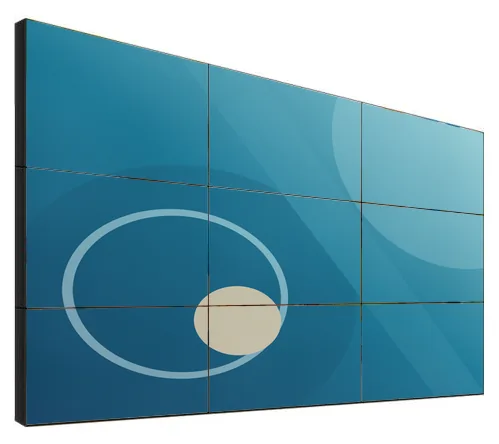
Panels fixed flat to the wall in a grid. The catalogue thumbnail shows a wall four panels wide and three high displaying one image.
- Sizes:
- The thumbnail is not captioned with a panel size.
Video walls
Family reference Ref KC-V01
A video wall built from narrow-bezel LCD panels, laid out to suit your wall and your content. We match the panel size, bezel option, brightness, mounting method and signal processing to the space, and tell you plainly that the joins between panels remain visible.
Quote-led, not a checkout: we confirm the configuration, price and lead time in your quotation.
Overview
The Kiosk Craft LCD Video Wall is a tiled display made from narrow-bezel LCD panels. The range is listed with panels of 46, 49, 55, 65 and 75 inch, brightness options of 500 or 700 cd/m², and example layouts from 2 × 2 up to 4 × 8. A wall is specified as a system: panels, mounting structure, signal processing and the content that will run on it.
Every LCD video wall has visible joins where panels meet. The catalogue gives bezel options of 0.88 mm, 1.7/1.8 mm and 3.5 mm. These are catalogue-stated figures, and it is not confirmed whether they describe the edge of one panel or the combined gap between two. We confirm the measurement for the panels you select, and we recommend designing content so that faces and small text do not sit across a join.
The range references 1920 × 1080 (Full HD) panels and 4K panels. Not every size is offered with every resolution, bezel and brightness option, so the combination is matched to a specific panel model with your quotation.
Four mounting methods are shown: fixed wall brackets, pop-out wall brackets, a floor-standing frame and a cabinet base. Video wall processor and matrix configurations are available for HDMI, DVI and VGA sources, a DisplayPort loop-through option is listed for chaining panels, and interactive touch is listed as an option.
Content is a separate decision from the panels. Scheduling and playback can be scoped through digital signage content management, and live data or control-room feeds through integrations, subject to the agreed integration. The brackets, frames and players around the wall are covered under display mounts and integration accessories. Hardware, software and installation are quoted separately.
Suitable applications
Example application: a large brand or campaign wall behind a till bank or at a shop entrance, with content scheduled across the trading day.
Example application: a welcome wall in a reception area showing brand films, visitor messages and company news.
Example application: a product wall in an automotive or interiors showroom, showing large-scale imagery that a single screen cannot deliver.
Example application: several sources shown side by side in an operations room, with the processor arranging windows across the wall.
Example application: event listings, live feeds and promotions in a venue foyer, cinema, bar or leisure centre.
Example application: a floor-standing wall used as a stand backdrop, specified with the frame it will travel with.
Key features
Panels are listed in 46, 49, 55, 65 and 75 inch. Panel size and layout together set the overall size of the wall.
Bezel options of 0.88 mm, 1.7/1.8 mm and 3.5 mm are catalogue-stated. Whether they describe one panel edge or the gap between two panels is confirmed with your quotation. The joins remain visible.
Two brightness options are listed. The brighter panel suits spaces with strong ambient light; neither is described for direct sunlight.
Example layouts of 2 × 2, 3 × 3, 4 × 4, 3 × 4, 5 × 6 and 4 × 8 are listed, and other arrangements are assessed per project.
Fixed wall brackets, pop-out wall brackets, a floor-standing frame and a cabinet base are all shown in the catalogue.
Video wall processor and matrix configurations are available for HDMI, DVI and VGA sources. We match the configuration to the number and type of sources you need to show.
The catalogue describes showing one image across the whole wall or combining separate windows. What is possible depends on the processor configuration.
A DisplayPort loop-through option is listed for chaining panels, which can reduce cabling on simpler walls.
Interactive touch is listed as an option. It is assessed against the size and layout of your wall.
Design options
Panels fixed flat to the wall in a grid. The catalogue thumbnail shows a wall four panels wide and three high displaying one image.
A two-by-two panel array housed in a dark floor-standing cabinet, with ventilated panels on the cabinet front below the screens.
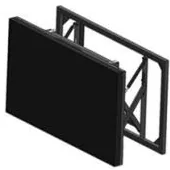
A three-by-three panel array carried on an open metal floor frame, with the structure visible beneath the panels.
A single panel on an extending scissor-style bracket, shown pulled forward from its wall frame.
Configuration options
Choose what you know and leave the rest. Catalogue options are pictured or stated for this range; anything else is recorded as a requirement for us to assess.
How many units this configuration is for (1 to 9,999).
Anything that helps us assess this item, for example where it will go or what it must connect to. Please do not include personal or payment details.
0 of 1,000 characters
No options chosen yet. You can add the item as it is and we will cover the details with you.
Quantity: 1 · 9 of 9 option groups left blank - we cover them in your quotation.
Adding an item builds your enquiry list. It is not an order or a checkout. We confirm the configuration, price and lead time in your quotation.
LCD Video Walls
Qty 1 · no options chosen yet
Technical specifications
How to read the markers
Where an attribute is not listed, it is not specified for the range. That never means the feature is absent.
These are individual panel sizes. The overall wall size follows from the layout
Matched to the selected panel model with your quotation
Not confirmed whether these are single panel-edge or combined panel-to-panel figures. Joins remain visible
Two listed options, not a continuous range
Depends on the processor configuration
Assessed for your layout
No weather protection is stated, so we treat this range as indoor equipment. Suitability for your location is confirmed with your quotation
Matched to the number and type of sources
A media player or PC is specified separately
Stated, optional and confirmed
Compatible software and services
Installation considerations
A video wall starts with a survey: wall construction and load, overall dimensions, viewing distances, and power, data and ventilation at the wall.
Panels need aligning to each other on site. The mounting method affects how easily a single panel can be reached later, which is why pop-out brackets are offered for wall-mounted arrays.
Floor-standing frames and cabinet bases suit walls that cannot take the load, and spaces where a wall may be relocated.
Allow space for the processor or matrix, the sources and their cabling, usually in a nearby cupboard or rack.
Plan for heat. A wall of panels gives off more heat than a single screen, so recessed installations need an agreed ventilation path.
Colour and brightness are matched across the panels during commissioning, once the wall is in its final position and lighting.
Survey, installation and commissioning are covered under installation and rollout and are set out in the quotation.
Related products
Mounts and peripherals
Wall, ceiling, floor, wheeled and video-wall mounting options, matched to the display you select. Compatibility is confirmed per project.
Digital signage media players
Android or PC-based media players that connect to a compatible display over HDMI, with Wi-Fi and mobile-data options. Software is scoped separately.
Wall-mounted advertising displays
Slim wall-mounted advertising screens in sixteen sizes from 10.1 to 98 inch, with Full HD as standard, an optional 4K panel and USB, Android or Windows playback.
Interactive whiteboards
Interactive 4K touch boards from 55 to 110 inch for meeting rooms, classrooms and training spaces, on the wall or on a mobile stand.
Frequently asked questions
Yes. An LCD video wall is made of separate panels, and a thin line is visible where they meet. The range has catalogue-stated bezel options of 0.88 mm, 1.7/1.8 mm and 3.5 mm, and it is not confirmed whether those describe one panel edge or the combined gap between two panels. We confirm the figure for the panels you select. Good content design also helps: keep faces and small text away from the joins.
The panels show whatever they are sent. A video wall processor or matrix takes one or more sources, such as a media player, a PC or a live feed, and spreads them across the panels. Processor and matrix configurations for HDMI, DVI and VGA sources are listed for the range. Scheduling content is a software decision, which can be scoped through digital signage content management.
Start from the wall and the content. The overall width and height, the viewing distance and the shape of your content decide the layout, and the panel size follows. Fewer, larger panels mean fewer joins; more, smaller panels give more flexibility in shape. Send us the wall dimensions and we will propose options.
The 500 cd/m² option is the usual starting point for interiors with controlled lighting. The 700 cd/m² option is the better choice where there is strong ambient light, such as an atrium or a bright shop interior. Neither is described for direct sunlight. For screens that face out through glass, see the high-brightness shop window displays.
Interactive touch is listed as a catalogue option. How it is added depends on the size and layout of the wall, so we assess it for your project rather than promise it. An interactive wall also needs an application designed for it, which is scoped and quoted separately.
A survey of the wall and the space, the mounting structure, the panels, signal processing and cabling, then alignment and colour matching on site. It is more involved than hanging a single screen, and it is described step by step under installation and rollout. Your quotation sets out what is included.
Add it to your enquiry with the options you know, or ask for advice. We recommend the right configuration and confirm it in a written quotation.