Interactive whiteboards
Interactive Whiteboards
Interactive 4K touch boards from 55 to 110 inch for meeting rooms, classrooms and training spaces, on the wall or on a mobile stand.
- 55 to 110 inch
- Indoor
- Wall-mounted / Mobile stand
- Touchscreen
Interactive displays
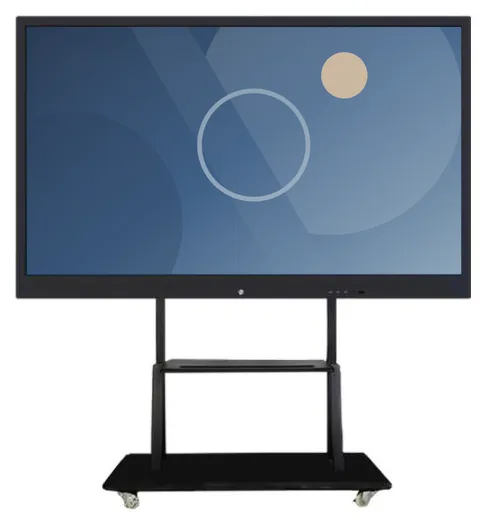
An interactive whiteboard replaces the projector, the flip chart and the screen on the wall with one surface that people can write on. The decision is mostly about the room. How far is the back row from the screen? Is there a wall that can carry it, or does it need to move between rooms? And which software do your people already use? The screen has to fit into that, not the other way round.
Interactive Whiteboards (view the range) are listed at 55, 65, 75, 85, 86, 98 and 110 inch, with 3840 × 2160 (4K UHD) resolution and 20-point infrared touch for writing, erasing and zooming. Android and Windows configurations are listed, including a dual-platform arrangement with a slot-in Windows PC module. A built-in camera, a microphone and anti-glare glass are options. The boards can be wall-mounted or fitted to a movable stand.
The range is described with built-in teaching and meeting functions, including wireless screen sharing. Which software features and licences come with a configuration is verified for that configuration and set out in your quotation. If you need something specific, such as a guided sales presentation or a training application, we can scope a bespoke application and quote it separately. Whiteboards are a common choice in education and training and in offices and reception areas.
Catalogue
One product family in this category
Interactive whiteboards
Interactive 4K touch boards from 55 to 110 inch for meeting rooms, classrooms and training spaces, on the wall or on a mobile stand.
Where they fit
Write, erase, zoom and bring up lesson material on one 4K surface. 20-point touch allows more than one pupil to work at the board at once, subject to the software in use.
Present a document, mark it up and keep the notes, without swapping between a projector and a flip chart. Wireless screen sharing is described for the range and verified for your configuration.
Example application: with the optional camera and microphone, the board becomes the screen for calls using your organisation's own conferencing software. Compatibility is confirmed for your configuration.
A board on a movable stand lets one screen serve several training rooms, and moves out of the way when the room is needed for practical work.
Give delegates a screen they can write on. A movable stand means the board follows the booking, rather than being tied to one room.
Example application: a salesperson walks a customer through options on a large touchscreen and records the outcome. The presentation application is scoped separately and can be linked to AI-assisted sales management software.
Choosing
Work back from the furthest seat. As a rough guide, 55 and 65 inch boards suit small meeting rooms, 75 to 86 inch boards suit classrooms and standard meeting rooms, and 98 and 110 inch boards suit halls and large training rooms. Every size is listed at the same 4K UHD resolution. For the largest boards, check the route into the room as well: doors, stairs and lifts.
Wall-mounting gives the tidiest result in a room with a fixed layout, provided the wall can carry the load and there are power and network points close by. A movable stand suits shared spaces, lets one board serve more than one room and avoids structural work. The stands pictured are wheeled. Stand details and wall fixings are confirmed with your quotation.
Android and Windows configurations are listed, and a dual-platform arrangement provides both: Android built in, and Windows on a slot-in PC module for the desktop software your organisation already uses. Choose by the applications you need to run. Supported platform versions and the PC specification are confirmed with your quotation.
All three are listed as options rather than standard equipment. A built-in camera and microphone make sense if the board will be used for video meetings; rooms with their own conferencing equipment may not need them. Anti-glare glass is worth asking about for bright rooms, or for boards that face a window.
If nobody needs to write on the screen, a wall-mounted advertising display or a video wall may suit the room better. Choose a whiteboard when writing, annotation and group interaction are the point.
Beyond the hardware
Applications and management tools are designed and built per project, then quoted separately from the hardware.
Questions
Start from the furthest seat and what needs to be read from it. As a rough guide, 55 and 65 inch boards suit small meeting rooms, 75 to 86 inch boards suit classrooms and standard meeting rooms, and 98 and 110 inch boards suit halls and large training rooms. If people will read spreadsheets or small text from the back, go up a size. Check the wall or floor space, the ceiling height and the route into the room as well. Tell us the room dimensions and we will suggest a size.
The range is described with built-in teaching and meeting functions: writing, erasing and zooming, document presentation and wireless screen sharing between devices. Which of those features, and which licences, come with a particular configuration is verified for that configuration and set out in your quotation. Please do not assume a feature is included until it is confirmed. If you need a function the built-in tools do not cover, we can scope it as a bespoke application, quoted separately.
A configuration with the Windows PC module runs Windows desktop applications, so software your organisation already uses can normally be installed under your own licences. Whether a particular application works well with the board's touch, camera and microphone is confirmed for your configuration, so tell us which applications matter before you order. The supported platform versions are confirmed with your quotation.
The range is stated with 20-point infrared touch, which means the screen can register up to 20 touch points at the same time. How that translates into people writing together depends on the software: some whiteboarding applications support several people writing at once, others fewer. If multi-user work is important, tell us, and we will confirm it for the software in your configuration.
Wall-mount it if the room has a fixed layout, the wall can carry the load, and power and network points are close by: the result is tidier and takes no floor space. Choose a movable stand if the board will be shared between rooms, if the wall is glazed or lightweight, or if you would rather avoid building work. Both options are listed for the range. The fixings, stand and mounting height are agreed for your site.
Installation can be included in your project. It covers the practical points that decide whether a board works well in the room: wall construction and fixings or stand assembly, mounting height, power and network points, and cable routes. The scope is agreed for your site and set out in the quotation. See installation and roll-out.
Describe what the screen needs to do and where it will go. We will recommend the right hardware and software and confirm the configuration in a written quotation.