KioskCraft
Your enquiry

Self-service kiosks

Portable battery-powered touchscreen displays

Battery-powered touchscreens on a movable stand, for pop-ups, events and shop floors where there is no socket nearby.
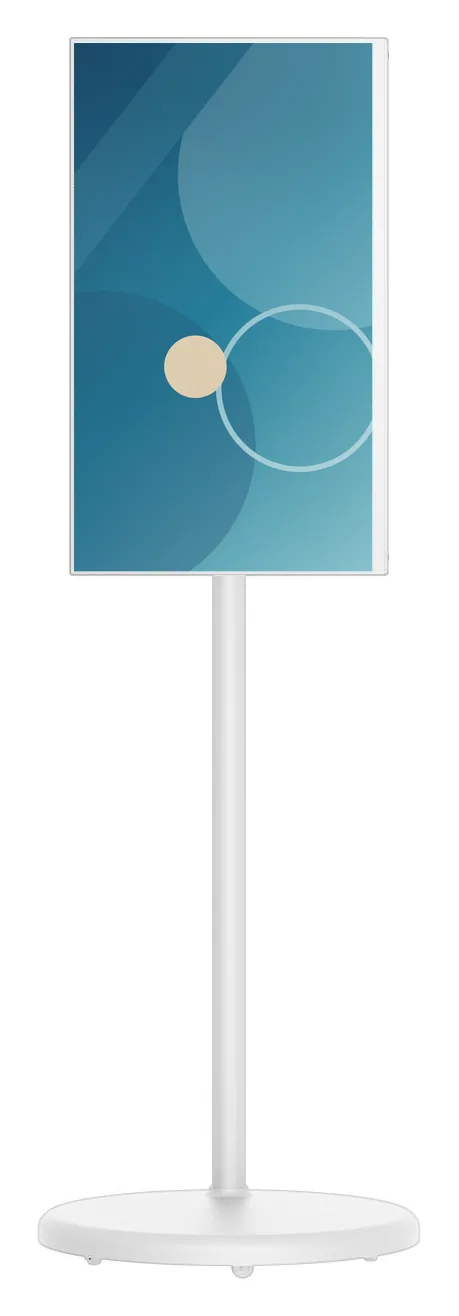
White portable battery-powered touchscreen display in portrait orientation on a slim pole with a round weighted base

Not every screen can be wired in. A pop-up stand, a shop floor that is rearranged every season, a foyer that is cleared every evening: these need a touchscreen that arrives, works and leaves without an electrician. The questions to ask are how long it must run between charges, whether the content is portrait or landscape, and who will move and charge it.

Portable Battery Touchscreen Displays (view the range) are listed at 21.5, 23.8, 27 and 32 inch, in white or black, with 10-point touch. The screen rotates 90 degrees between portrait and landscape and tilts up to 45 degrees, and the stand height adjusts by 180 mm. A 230 Wh battery is stated, with a catalogue-stated runtime estimate of 4 to 5 hours of continuous use that depends on configuration and usage.

The platform and its supported version are confirmed with your quotation, and chosen to suit what you want to show: a touch application, a product presentation or scheduled signage content. We scope the software with you and quote it separately from the display.
Catalogue

Products in this category

Each product family covers several designs and sizes. Open a family to see its options and stated specifications, or add it to your enquiry and tell us what you need.

One product family in this category

Where they fit

Suitable applications

Typical uses for the products in this category, drawn from the catalogue. The configuration for your site is confirmed with your quotation.
  • Pop-up shops and events

    Example application: a product presentation or sign-up screen on an exhibition stand or in a pop-up unit where power is limited. Plan charging around the runtime estimate, particularly for full-day events.

  • Shop-floor demonstrations

    Example application: staff move the display to a department to demonstrate a product range, then move it again for the next promotion, without waiting for a socket to be installed.

  • Assisted selling and consultations

    Example application: a salesperson and a customer stand at the screen to explore a product or compare options. The rotating, tilting screen adjusts for standing or seated conversations.

  • Temporary information points

    Example application: an event programme, queue information or directions, placed where they are needed on the day and removed afterwards.

  • Small-group briefings

    Example application: a movable touchscreen for team briefings or training in a space that has no wall-mounted display.

Choosing

How the options differ

The decisions that separate one option from another, and what each one depends on.
  1. Step 1

    Battery portable or mains-powered kiosk

    A portable display earns its place when the screen has to move, or when there is no socket where you need it. The runtime is a catalogue-stated estimate of 4 to 5 hours that depends on configuration and usage, so plan when and where it will be charged. For all-day unattended service in one place, a fixed mains-powered kiosk is the better choice.

  2. Step 2

    Portrait, landscape, tilt and height

    The screen rotates 90 degrees, so the same unit can show portrait posters and landscape video or presentations. It tilts up to 45 degrees and the stand height adjusts by 180 mm, which helps when the person using it is seated, or when glare from overhead lighting is a problem. Content needs to suit the orientation you use, so agree that with whoever produces it.

  3. Step 3

    Choosing between 21.5 and 32 inch

    The 21.5 and 23.8 inch options suit one-to-one use at arm's length and take up less room on a busy shop floor. The 27 and 32 inch options are easier for a small group to read, and work better as a poster when nobody is touching the screen. Battery runtime can vary with screen size and brightness, so the estimate is confirmed for your configuration.

  4. Step 4

    Portable display or transaction kiosk

    No printer, scanner or payment bracket is listed for the portable range. If customers need to pay, print or scan, look at countertop or freestanding ordering kiosks, or tell us the requirement so that we can assess it.

Beyond the hardware

Software and solutions that go with these products

Software scoped around these products

Applications and management tools are designed and built per project, then quoted separately from the hardware.

Solutions that use them

Hardware, software and services combined around a job you need done.

Questions

Portable battery displays: frequently asked questions

How long does the battery last?

A 230 Wh battery is stated for the range, with a catalogue-stated estimate of 4 to 5 hours of continuous use. That is an estimate, not a promise: runtime depends on configuration and usage, including screen size, brightness and what the display is running. For a full trading day or a long event, plan for charging breaks. Charging time, and whether the display can run while it charges, are confirmed with your quotation.

Can a portable battery display be used outdoors?

No outdoor rating or brightness figure is stated for this range, so we treat it as an indoor product. It is not specified for rain, dust or direct sunlight. For outdoor positions, look at outdoor kiosks or outdoor advertising displays.

Can it take payments or print receipts?

No printer, scanner, NFC reader or payment bracket is listed for the portable range, so these are not options we can offer as standard. If you need them, tell us and we will record the requirement to assess. If taking orders and payments is the main job, an ordering kiosk from the countertop or freestanding range is the better fit.

What software can it run?

The platform and its supported version are confirmed with your quotation, so tell us what you plan to run. Example uses are a touch product presentation, a sign-up form, or scheduled promotional content. We can scope a bespoke application, or discuss how signage content would be scheduled and updated: see digital signage content management. Software is quoted separately from the display.

How is the display moved, charged and kept secure?

The display is a single unit on its own stand, designed to be moved between positions by your staff. Details of the base, including how it moves and whether it can be locked in place, are confirmed with your quotation, along with the charger supplied. Because it is portable by design, decide where it will be stored and charged overnight, and who is responsible for it during the day.

Tell us what you need

Describe what the screen needs to do and where it will go. We will recommend the right hardware and software and confirm the configuration in a written quotation.