KioskCraft
Your enquiry

Portable battery displays

Kiosk Craft Portable Battery Touchscreen Display

Family reference Ref KC-K07

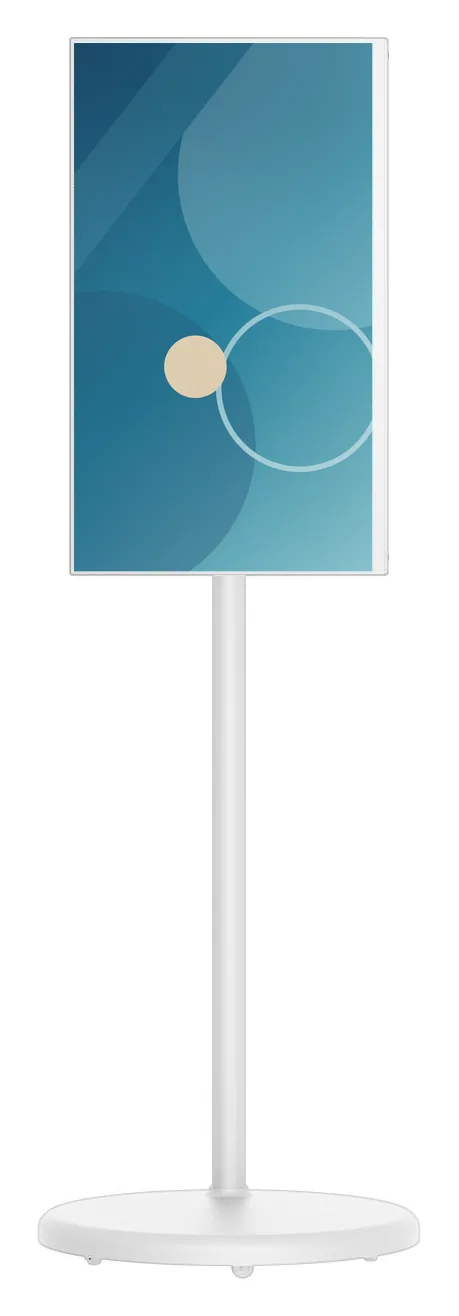
White portable battery-powered touchscreen display in portrait orientation on a slim pole with a round weighted base
Example design and example on-screen content shown

A touchscreen on a slim wheeled stand with its own battery, so it can work where there is no socket nearby. The screen turns between portrait and landscape, tilts back and adjusts in height, which lets one unit serve a promotion in the morning and a consultation in the afternoon.

  • 21.5 to 32 inch
  • Indoor
  • Mobile stand
  • Touchscreen
  • Battery powered
Product sheet

Quote-led, not a checkout: we confirm the configuration, price and lead time in your quotation.

Also listed under Interactive displays.

Overview

About this range

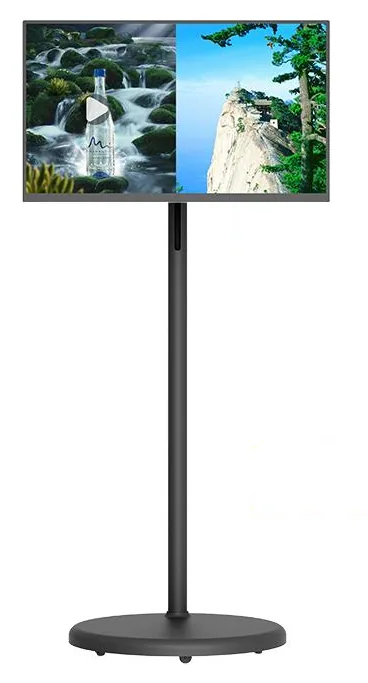
The Kiosk Craft Portable Battery Touchscreen Display is a slim touchscreen on a single pole with a round wheeled base. The range is listed in 21.5, 23.8, 27 and 32 inch sizes, in black or white, with 10-point touch. It is made for the shop floor rather than a fixed position: staff can wheel it to a promotional bay, a queue or a customer.

An articulated arm carries the screen. The catalogue diagrams show it rotating through 90° between portrait and landscape, tilting back by up to 45° and adjusting in height by 180 mm. The same unit can therefore work as a poster, an angled browsing screen or a shared screen for a conversation.

The range references a 230 Wh battery and 4–5 hours of continuous work. That runtime is a catalogue-stated estimate that depends on configuration and usage: screen size, brightness, content and wireless activity all affect it. Tell us how long the display needs to run between charges and we will confirm what to expect, and how the unit is charged, with your quotation.

The catalogue does not state the operating system, the network connections or the display brightness, so these are confirmed before any software work is planned. Content scheduling can be scoped through digital signage content management, and interactive applications through bespoke kiosk software. Hardware and software are quoted separately.
Suitable applications

Where this range fits

Example applications. The software and integrations behind each one are scoped for the project.

Key features

What this range offers

Stated features are printed for the range; optional ones are available on request. Neither means every design includes the item.

Design options

One design is pictured for this range

Each design is a different enclosure or format. Availability for your size and configuration is confirmed with your quotation.

Configuration options

Configure and add to your enquiry

Choose what you know and leave the rest. Catalogue options are pictured or stated for this range; anything else is recorded as a requirement for us to assess.

Screen sizeChoose one

ColourChoose one

Operating platformChoose one

The catalogue does not state the operating system for this range. Tell us what your software needs and we will confirm what can be supplied.

ConnectivityTick all that apply

Network options are not stated for this range, so each is recorded as a requirement for us to confirm.

BrandingTick all that apply

Software requirementTick all that apply

Software is scoped and quoted separately from the hardware.

How many units this configuration is for (1 to 9,999).

Anything that helps us assess this item, for example where it will go or what it must connect to. Please do not include personal or payment details.

0 of 1,000 characters

Your selections

No options chosen yet. You can add the item as it is and we will cover the details with you.

Quantity: 1 · 6 of 6 option groups left blank - we cover them in your quotation.

Adding an item builds your enquiry list. It is not an order or a checkout. We confirm the configuration, price and lead time in your quotation.

Request advice

Technical specifications

Specifications

Family-level information from the catalogue. Values that depend on the design or configuration are confirmed with your quotation.

How to read the markers

Stated
Printed for this range in the catalogue. Range-level statements do not mean every design includes the item.
Optional
Described as an option or a custom build for the range, available on request.
Confirmed at quotation
Not fixed for the range. We confirm it for your configuration in your quotation.
To be confirmed
The catalogue information is unclear, so we check it before quoting.

Where an attribute is not listed, it is not specified for the range. That never means the feature is absent.

Display

Screen sizes
21.5, 23.8, 27 and 32 inchStated
Orientation
Rotates through 90° between portrait and landscapeStated

Touch and interaction

Touch
10-point touchscreenStated
Touch technology
10-point multi-touch. The touch construction is confirmed with your quotationStated

Installation

Mounting
Mobile floor stand with a single pole and a round wheeled baseStated
Environment
Indoor useStated

No weather protection is stated for this range

Construction and finish

Adjustment
Tilts by up to 45° and adjusts in height by 180 mm, as shown in the catalogue diagramsStated
Finish
Black or whiteStated

Power and environment

Battery
Battery poweredStated
Battery capacity
230 Wh battery referenced for the rangeStated

Confirmed for the selected screen size with your quotation

Battery runtime
4–5 hours of continuous work — a catalogue-stated estimate that depends on configuration and usageStated

Catalogue-stated estimate

Power
Charging method, charging time and use while charging are confirmed with your quotationConfirmed at quotation

Stated, optional and confirmed

What is stated, what is optional, and what we confirm

Range-level statements do not mean every design includes every item. Missing information is not specified, never assumed.

Stated for this range

  • Screen sizes of 21.5, 23.8, 27 and 32 inch
  • 10-point touchscreen
  • Battery powered, with a 230 Wh battery referenced
  • Catalogue-stated runtime of 4–5 hours, depending on configuration and usage
  • Screen rotation through 90° between portrait and landscape
  • Tilt adjustment of up to 45°
  • Height adjustment of 180 mm
  • Black or white finish

Available as options

  • Custom colour or printed branding, assessed per project
  • Content scheduling software, scoped and quoted separately
  • Interactive applications developed around your requirements, quoted separately
  • Device monitoring and management, scoped and quoted separately

Confirmed with your quotation

  • Operating system and platform version
  • Display resolution and brightness
  • Wi-Fi, wired network or mobile data options
  • Charging method, charging time and whether the display runs while charging
  • Expected runtime for your screen size, brightness and content
  • Whether the castors lock, and the weight and stability of the unit
  • Speakers, camera or other built-in peripherals, which the catalogue does not describe
  • Battery replacement arrangements over the life of the unit

Compatible software and services

Software, solutions and services

Software is scoped and developed per project and quoted separately from the hardware.

Software

Solutions

Services

Installation considerations

Planning the installation

  1. No fixed installation is needed. The display is a wheeled unit, and assembly and first set-up are covered in the quotation.

  2. Plan a charging point and a routine, for example overnight charging, that fits your trading hours. Charging details are confirmed with your quotation.

  3. Use on level indoor floors. Thresholds, ramps and thick carpet affect how easily the unit moves.

  4. Choose supervised positions in public areas and agree where the unit is stored out of hours.

  5. If content updates over a network, check wireless coverage in every position where the display will be used.

Frequently asked questions

Questions about portable battery touchscreen displays

How long does the battery last?

The catalogue references a 230 Wh battery and 4–5 hours of continuous work. Treat that as a catalogue-stated estimate that depends on configuration and usage. A larger, brighter screen playing video over a wireless connection will use more power than a small screen showing still images. Tell us your screen size, content and working day, and we will confirm what to expect with your quotation.

How is the display charged, and can it run while plugged in?

The catalogue does not describe the charger, the charging time or whether the display runs while charging, so we confirm these with your quotation. If the display needs to cover a full trading day, say so at the start: it affects which configuration we recommend and how you plan charging.

Which operating system does it use?

The catalogue does not state the platform for this range. We confirm the operating system and version before any software work is planned, because it decides which applications and content tools can run on the display.

Can it be used outdoors?

No weather protection is stated for this range and the catalogue lists indoor venues, so we treat it as indoor equipment. For outdoor positions, see outdoor advertising displays and outdoor kiosks.

Can customers order or pay on it?

It is a touchscreen display rather than a payment kiosk: the catalogue does not describe a printer, a scanner or a payment-terminal bracket. A browsing or ordering application can be scoped as bespoke kiosk software. If customers need to pay and collect a receipt at the screen, the ordering and payment kiosks are designed for that.

Is it stable enough for a public space?

The pictured stand has a round base on small castors. Whether the castors lock, and the weight of the unit, are confirmed with your quotation. We recommend supervised positions on level floors, and agreeing where the display is kept when the premises are closed.

Ready to talk about this range?

Add it to your enquiry with the options you know, or ask for advice. We recommend the right configuration and confirm it in a written quotation.