KioskCraft
Your enquiry

Industries

Reception and information screens for healthcare settings

Information screens, wayfinding touchscreens and arrival kiosks for GP practices, dental surgeries, clinics and hospital departments. We supply display and kiosk hardware and scope the software. We do not supply medical devices and make no clinical claims.

A reception desk under constant pressure

In a GP practice, dental surgery, clinic or hospital department, the reception desk carries a heavy load. Phones ring while people queue to say they have arrived, first-time visitors ask where to go, and staff repeat the same directions all day.

Notices change often, and paper signs multiply until the important one is hard to find. Visitors may be anxious, unwell or unfamiliar with the building, and many have sight, hearing, mobility or language needs.

Our role is limited and practical: screens that show information clearly, touchscreens that help people find their way, and arrival kiosks where your appointment system allows it. See wayfinding and check-in.

Example applications

Illustrative examples only. They are not accounts of completed customer projects.
  • Waiting-room information screen

    For example, a wall-mounted display shows opening times and service notices supplied by the practice, in type large enough to read from the seats.

  • Wayfinding at the main entrance

    For example, a floor-standing touchscreen lets visitors search for a department and see a route, including a step-free option.

  • Arrival check-in, where the appointment system allows

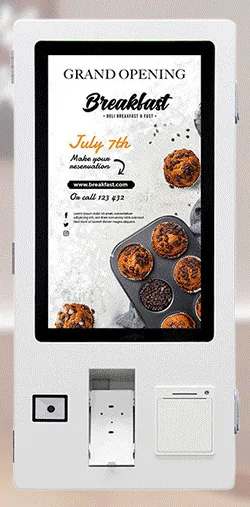
    For example, a wall-mounted kiosk lets patients confirm they have arrived without queueing. This scoped integration depends entirely on your appointment system.

  • Sanitiser point with a notice screen

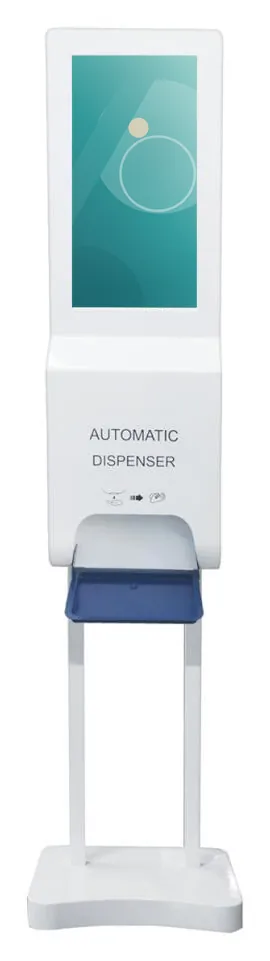
    For example, a sanitiser display kiosk at an entrance combines a gel dispenser with a screen for visitor notices. We make no health claim for it.

Hardware families that suit reception and waiting areas

Options described for a range are not standard on every model. Sizes, options and ratings are confirmed with your quotation.
  • All-in-one information kiosks

    Wall-mounted and floor-standing touchscreens for wayfinding and information. Height, angle and reach are agreed for seated and standing users.

  • Wall-mounted kiosks

    From the ordering kiosk range: keeps corridors and waiting areas clear and suits a scoped arrival check-in.

  • Wall-mounted advertising displays

    For notices and general information in waiting areas, from small door-side screens to large wall displays.

  • Sanitiser display kiosks

    A 21.5 inch display combined with a gel dispenser, wall-mounted or on a floor stand. Supplied as a display and a dispenser only.

  • Temperature-screening terminals

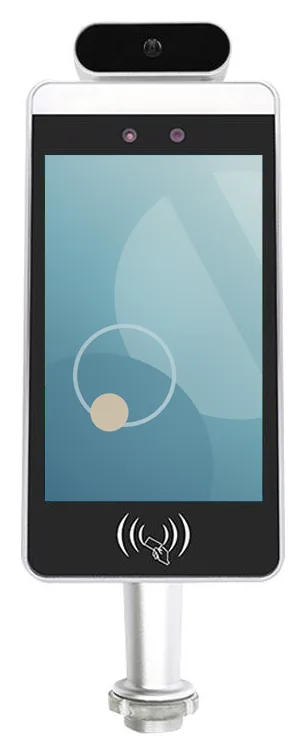
    An 8 inch terminal with a temperature sensor. It is not a medical device, it does not diagnose anything and we make no accuracy claim for it.

Software that would need scoping

Scoped and developed per project, and quoted separately from the hardware.
  • Information screen content

    Who writes and approves notices, how they are scheduled and how an urgent message is published quickly.

  • Wayfinding software

    Building plans, department names, step-free routes, languages and how room changes are kept up to date.

  • Appointment system integration

    Arrival check-in depends on whether your appointment system offers a supported way to connect. Assessed first, never promised.

  • Device management

    How screens are kept locked to their purpose, updated and checked, and who is told when one goes offline.

Questions to be ready to answer

  • Which appointment system do you use, and does its supplier support check-in by other software?
  • What personal information would appear on or be typed into the screen, and could people nearby see it?
  • Who approves data protection and information governance matters?
  • Where will screens stand in relation to seating, doors and queues, and is there power and network?
  • What accessibility needs apply: reach height, text size, contrast, audio, languages?
  • Which cleaning products and routine will be used? Cleaning guidance is confirmed with the hardware specification.
  • Who updates notices, and how quickly must an urgent change appear?
  • If a kiosk is unavailable, is the reception desk always an alternative?

What this includes — and what it does not

What we do not claim

None of this hardware is a medical device, and we make no clinical, diagnostic or infection-control claims for any product, including the temperature-screening terminal and the sanitiser display kiosk.

Check-in and wayfinding links to your systems are scoped integrations. Decisions about patient data, privacy and clinical suitability rest with your organisation.

Hardware that fits

Product families that suit the applications on this page. Options are confirmed with your quotation.

Guides to read next

Frequently asked questions

Can a kiosk check patients in for appointments?

Only if your appointment system provides a supported way for other software to connect. We establish that before quoting. An information or wayfinding screen needs no such link.

How is patient privacy handled at the screen?

It is considered at scoping: what is shown, how little is typed, how quickly the screen clears and where the unit stands. Your organisation remains responsible for its own data protection assessment, and we set out what the software would collect and store.

How should the screens be cleaned?

Guidance depends on the glass and housing of the model chosen, so we confirm it with the hardware specification. Tell us the products and routine you use and we will check them before you order.

Is the temperature-screening terminal a medical device?

No. It is an entrance terminal with a temperature sensor. It does not diagnose anything and we make no claim about its accuracy. Whether to use one is your organisation's decision.

Ask for advice on your reception or waiting area

Tell us about your building, your visitors and the appointment system you use. We will suggest suitable screens and say plainly which integrations would need assessing before anything is quoted.