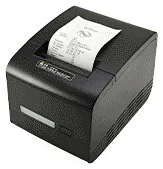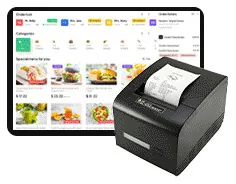
Kitchen Display System
A kitchen touchscreen that shows incoming orders from kiosks and tills. Hardware and software are scoped together, with or without a kitchen ticket printer.
- Touchscreen
Restaurant workflow
Family reference Ref KC-R01
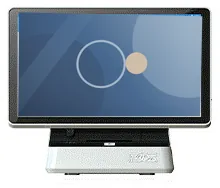
Self-service does not replace the till. A cashier station takes orders from customers who would rather speak to someone, handles queries and changes, and shares one order flow with your kiosks and kitchen — scoped as part of a complete restaurant system.
Quote-led, not a checkout: we confirm the configuration, price and lead time in your quotation.
Overview
Every restaurant configuration we illustrate keeps a staffed position alongside the self-service kiosks. Some customers prefer to order from a person, some orders need a conversation, and someone has to be able to look up, change or re-send an order. The cashier station is that position: a POS terminal at the counter that feeds the same kitchen and collection flow as the kiosks.
We do not publish a fixed hardware specification for the cashier station. The terminal, its screen size, the operating platform and the till peripherals are chosen to suit the POS software you run — or the software we scope for you — and are confirmed with your quotation. That is deliberate: a till that does not suit its software is the wrong till, whatever its specification.
In the workflow we illustrate, an order taken at the till travels the same route as one placed at a kiosk, a tablet or a table QR code. It reaches the kitchen on a kitchen display or a kitchen printer, and the order number appears on the collection screen when the food is ready. Requirements such as multi-language order screens can be included in the software scope.
If you already have a POS system, the question is usually integration rather than replacement: can kiosk orders arrive in your existing system, and can it drive the kitchen and collection screens? We assess that before anything is quoted. See restaurant ordering software and integrations for how the software is scoped. Hardware, software development and ongoing management are described and quoted separately.
Suitable applications
One staffed till beside a bank of kiosks, for customers who prefer to order in person. Both routes feed the same kitchen flow, so the kitchen sees one queue of orders rather than two.
A place to deal with the orders a kiosk handles badly: questions about ingredients, large group orders, or a customer who needs help. What staff can change or re-send is agreed in the software scope.
Staff enter orders taken at the bar or the table, for example in a venue that combines table service with self-service ordering at busy times.
A café with one till and one kiosk needs the same joined-up flow as a larger site. The system is scoped around the number of order points you have, and can be planned for more.
Key features
The cashier station appears in each restaurant configuration we illustrate: with a kitchen screen and collection screen, with a kitchen printer and collection screen, and with a kitchen printer alone.
In the illustrated workflow, orders from the till join those from kiosks, tablets and table QR codes on their way to the kitchen. How that works for you is set out in the agreed software scope.
Order screens that switch between languages are part of the illustrated POS workflow, and can be included in the software scope where your team or customers need them.
The terminal is selected to suit the software it will run, whether that is your existing POS or software scoped for the project. The hardware specification is confirmed with your quotation.
Receipt printing, scanning and other till peripherals are selected for your counter rather than assumed. The card terminal comes from your payment provider.
Where you want to keep your current POS, we assess whether kiosk orders can be passed into it and what it can send to kitchen and collection screens. The result decides the scope.
Configuration options
Choose what you know and leave the rest. Catalogue options are pictured or stated for this range; anything else is recorded as a requirement for us to assess.
How many units this configuration is for (1 to 9,999).
Anything that helps us assess this item, for example where it will go or what it must connect to. Please do not include personal or payment details.
0 of 1,000 characters
No options chosen yet. You can add the item as it is and we will cover the details with you.
Quantity: 1 · 6 of 6 option groups left blank - we cover them in your quotation.
Adding an item builds your enquiry list. It is not an order or a checkout. We confirm the configuration, price and lead time in your quotation.
Restaurant POS / Cashier Station
Qty 1 · no options chosen yet
Technical specifications
How to read the markers
Where an attribute is not listed, it is not specified for the range. That never means the feature is absent.
Functions are agreed in the software scope and confirmed with your quotation
The card terminal comes from your payment provider
Stated, optional and confirmed
Compatible software and services
Installation considerations
Allow counter space for the terminal, its peripherals and the card terminal from your payment provider, with cable access beneath the counter.
Provide mains sockets and a network connection at the till position. The till, kiosks, kitchen and collection screens need to reach each other, so the site network is part of the survey.
Decide where the till sits in relation to the kiosks, so that staff can see customers who need help at a screen.
Agree who changes menus and prices, and from where. That decision belongs in the software scope rather than being left to installation day.
Setup across one site or many, and handover to your team, can be planned as part of our installation and rollout service.
Related products
A kitchen touchscreen that shows incoming orders from kiosks and tills. Hardware and software are scoped together, with or without a kitchen ticket printer.
Digital menu boards
Collection screens that show customers which orders are being prepared and which are ready, linked to your kiosks, tills and kitchen.
Mounts and peripherals
Printers, scanners, NFC readers, card-terminal brackets and custom modules for ordering kiosks — compatible options chosen per design, not universal fittings.
Countertop kiosks
Compact self-service ordering terminals for counters and reception desks. Nine designs with 15.6, 21.5 and 24 inch screen references.
Freestanding kiosks
Freestanding self-service ordering kiosks in fourteen enclosure styles, from slim pole stands to full-height towers, with 15.6 to 32 inch screen references.
Digital menu boards
Single or multi-screen digital menu boards for counters and collection points, built from our display families and paired with content management scoped to you.
Frequently asked questions
In most restaurants, yes. Every configuration we illustrate keeps a staffed cashier station alongside the kiosks — for customers who prefer to order from a person, for orders that need a conversation, and so that staff can look up or change an order. How many tills you keep is a decision about your service, and we scope the system around it.
There is no fixed specification. The terminal is selected to suit the POS software it will run, and its screen size, operating platform and peripherals are confirmed with your quotation. If you already have till hardware you want to keep, tell us what it is and we will assess whether it can be part of the system.
Possibly. The important question is whether kiosk orders can be passed into your POS, and whether it can drive kitchen and collection screens. That depends on the integration routes your POS offers. We assess this first, and the agreed integration is described and quoted separately from the hardware.
That is the workflow we illustrate: orders from the till, kiosks, tablets and table QR codes arrive in one kitchen queue. It is delivered by the ordering software, so it is part of the software scope rather than a property of the till hardware.
No. Card terminals are supplied by your payment provider. We plan a position for it at the till, and any link between the POS software and the terminal is part of the agreed integration.
As part of a scoped restaurant system. The quotation sets out the station hardware and peripherals, with the price, lead time, warranty and support terms. Software development, integrations and ongoing management are described and quoted as separate items.
Add it to your enquiry with the options you know, or ask for advice. We recommend the right configuration and confirm it in a written quotation.